Armies take and hold ground, and ground is what a peace deal is made of. An army is a stack of units (regiments) that moves, fights and besieges as one. This page covers raising armies, commanding them, and the factors that decide a battle.
Where to find it
- Military › Forces (M opens Military by default) lists your armies with status, morale and HP, and any ongoing battles.
- Military › Recruit, or the Recruit button on the rail (U by default), is where you raise units.
- The unit bar appears at the bottom of the screen when you select an army on the map or in the list.
- The Military map mode (F4 by default) and the MANPOWER figure in the top bar help you plan.
How it works
Unit types
| Unit | Role | Raised at |
|---|---|---|
| Infantry | Cheap line unit that defends better than it attacks; steady in cities | Barracks |
| Mechanized Infantry | Faster line unit, strong on plains, weak in mountains and jungle | Barracks |
| Armor | Strong in attack and defence on plains and desert; poor in mountains, forest and jungle | Barracks |
| Artillery | The highest attack and a very weak defence; slow; speeds up sieges | Barracks |
| Special Forces | Small units that keep their strength in every terrain | Military Base |
| Air Defense | Weak in battle; reduces the damage air strikes do to its army | Barracks |
| Mobile Launcher | No attack and almost no defence | Mobile Launcher Facility |
Costs, stats and upkeep are in the units reference. Missiles are not carried by the Mobile Launcher unit: where they are based is explained in Missiles and missile defence.
Manpower and reserves
Soldiers come from your population in two steps. Each month part of the men who come of age joins your Reserve. Each month a share of the Reserve becomes Manpower, the pool you recruit from. A larger defence budget, and some laws and doctrines, speed up both steps.
Raising a land unit takes its manpower out of the pool at once: 5,000 men for an Infantry regiment. The Reserve also pays for healing: damaged armies recover their strength by drawing on it, so heavy losses compete with new recruitment. Disbanding a unit returns half its manpower.
Contract soldiers turn money into manpower. On Military › Overview, set a target on the Contract soldiers card and press Set Target; the men are hired month by month, up to a cap tied to the size of your own manpower pool.
Recruiting
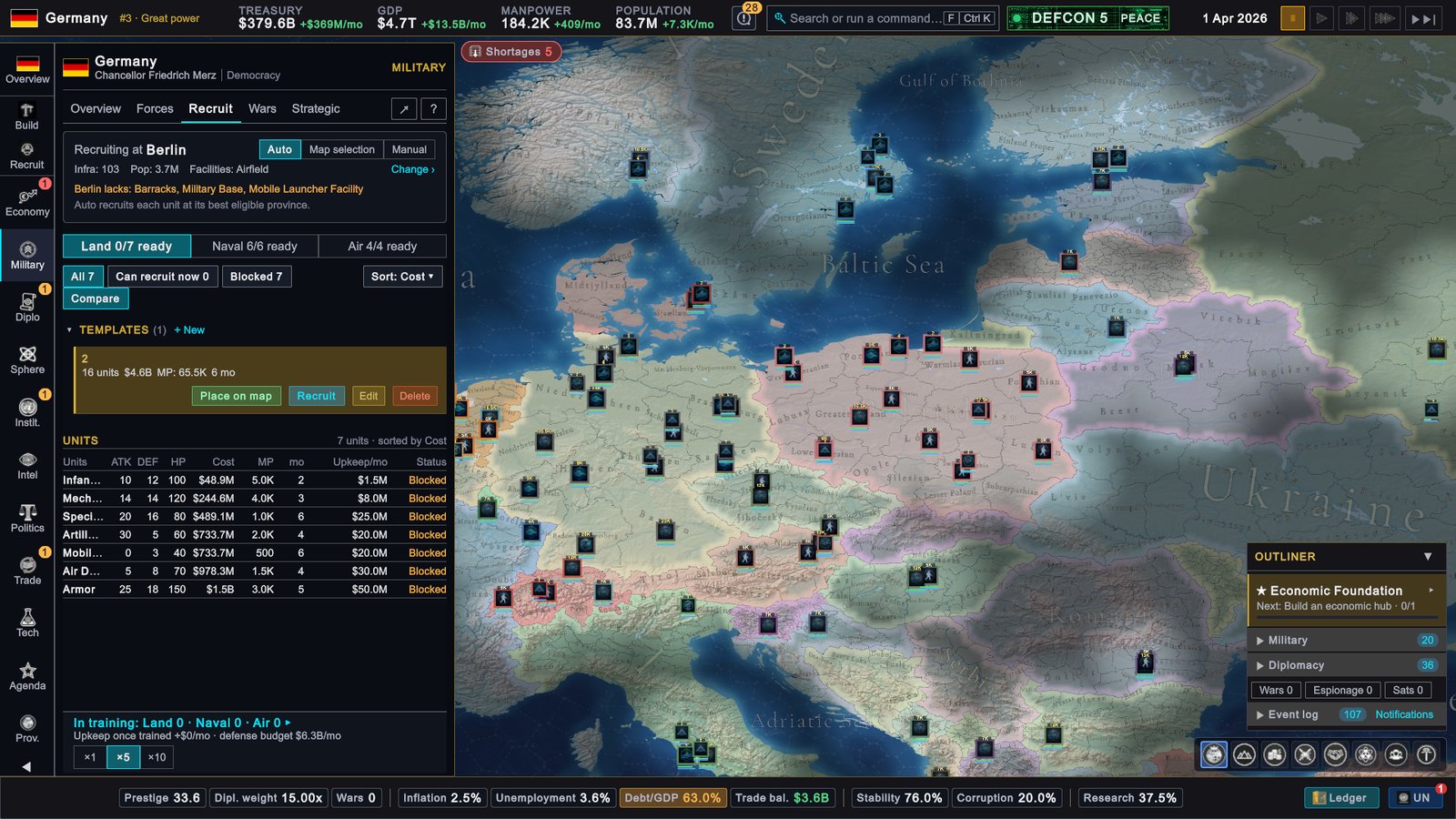
The top of the Recruit tab decides where units are raised:
- Auto raises each unit at its best eligible province.
- Map selection asks you to click the province for each unit.
- Manual raises everything at the province shown; Change › picks another.
Each unit card shows attack, defence, HP, cost, manpower and build time, with Recruit and Place on map. A card that cannot be used says why, for example “Needs Barracks · 0 eligible”: no province of yours has the building. The ×1, ×5 and ×10 buttons set how many each click orders.
The price and the manpower are taken when you place the order. Build time is listed in months, training advances every day, and better infrastructure in the province shortens it. Orders run in parallel, and the In training line at the bottom counts the units being built in each branch. A finished unit joins an army already standing in its province, or forms a new army named after the province.
Templates are saved army designs. + New opens the editor, where you name the template and add units. On a template, Recruit orders the whole list across your eligible provinces, and Place on map lets you click a rally province: the units are built nearby, march there and merge into one force. A template is ordered whole or not at all, so it is refused if you lack the money or the manpower for all of it.
Organising armies
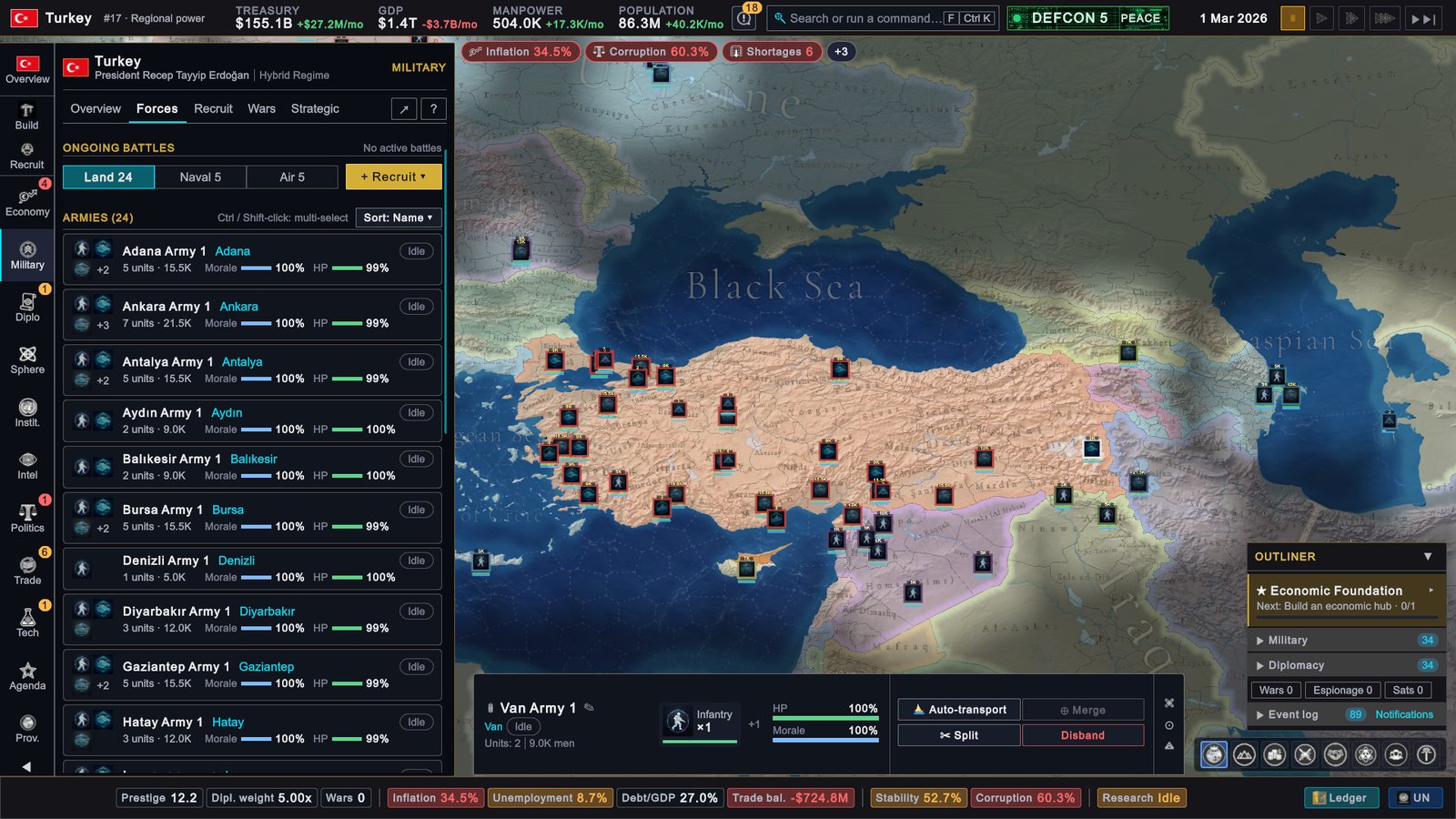
The unit bar shows the army’s name, where it is, what it is doing, its units, and bars for HP and morale.
- Rename. Click the pencil next to the name. An empty name returns the army to its province name.
- Split moves the units you choose into a new army in the same place. It needs at least two units.
- Merge all joins the idle armies you have selected in one province.
- Disband is the red button at the end of the bar.
- Control groups. Press Ctrl and a number key to save the current selection as a group, and the number alone to select it again. A group can mix armies, fleets and air wings.
Hold Ctrl or Shift and click rows in the Forces list to select several armies.
Moving and attacking
Select an army and right-click a province to march there. The game picks the route. The slowest unit sets the pace, rough terrain such as mountains, jungle and wetland slows a march, and good infrastructure speeds it. You can enter your own land, the land of allies and of countries fighting on your side, and the land of countries you are at war with. If the destination is across the sea, the order books a sea transport, described on the Navy page.
Armies at war fight when they meet in a province. Right-click an enemy army’s marker and your army pursues that army as it moves. Cancel move drops the current order. An army in a battle takes no new orders until the battle ends.
What decides a battle
A battle is fought in daily rounds, and each round both sides deal damage from their total strength. One side fights with its units’ attack values and takes 30% less damage in return; the other fights with its units’ defence values.
| Factor | Effect |
|---|---|
| HP | A unit fights in proportion to its remaining HP |
| Terrain | Each unit type has its own multiplier for the terrain, the same in attack and defence |
| Morale | Full strength at full morale, falling to half at zero |
| Readiness | If your defence budget does not cover unit upkeep, all your armies fight weaker, down to 35% |
| Fortifications | Defensive buildings raise the strength of the province’s owner, up to double |
| Frontage | About 35 regiments’ worth of strength counts per side; a larger stack lasts longer but hits no harder |
| Research and doctrines | Attack and defence bonuses of the country leading each side |
| Air support | Close air support adds up to 30% |
| Late arrival | Reinforcements start at 70% and reach full strength over five days |
| Landing | For three days after coming ashore, an army fighting with attack values does so at 70% |
| Cut off | An army in a blockaded port with no land route to its capital fights at 70% and does not recover |
| Chance | Each round’s damage varies by up to 20% either way |
Morale falls with losses and with losing the day. At 20% morale an army breaks and retreats to the province it came from, and the other side is credited with a battle won. Fighting adds devastation to the province. Out of combat an army recovers morale and HP day by day, faster on home soil, but not while it besieges or travels by sea.
Apart from the blockade rule in the table, armies on land have no supply system to manage.
Sieges and the battle page
An army standing in an enemy province besieges it and then holds it; Peace and occupation explains the rules. An army’s status reads Sieging with the province name.
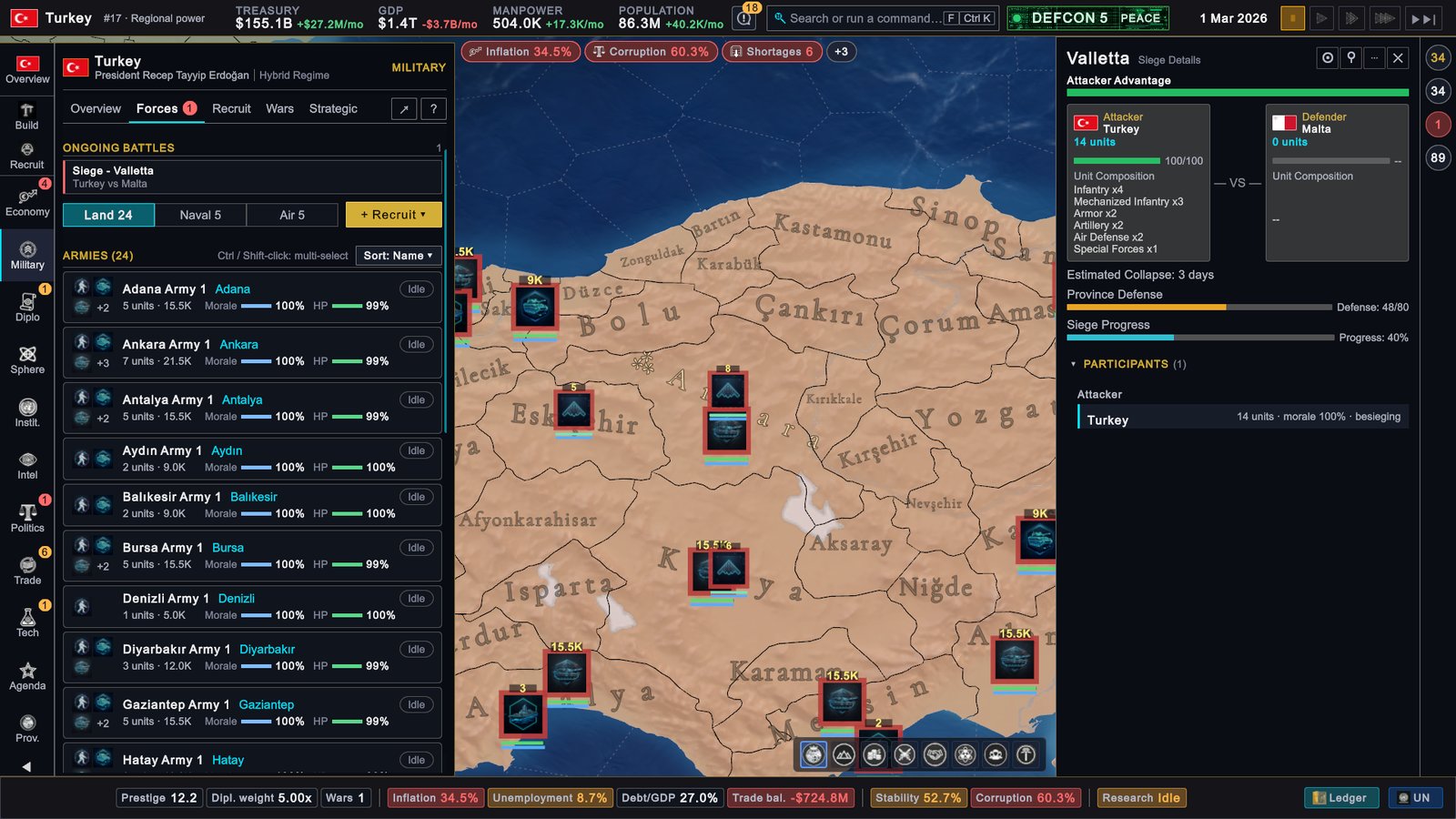
Click a battle under ONGOING BATTLES on the Forces tab, or on the war page, to open Combat Details: the armies on each side, their unit composition, the duration in days, and a verdict of Attacker Advantage, Defender Advantage or Even Battle.
What to do
- Fund your upkeep before a war. Low readiness weakens every army at once.
- Match units to ground. Armor on plains, infantry in cities, special forces in mountains and jungle.
- Bring artillery to sieges. Its defence is very weak, so do not leave it to hold ground alone.
- Do not overstack one battle. Past about 35 regiments, send the surplus to besiege elsewhere.
- Rest broken armies. Morale and HP return only out of combat, and healing spends your Reserve.
- Save a template for the army you build most, and rally it near the front.