A mod is a package that changes the game: new buildings, units or events, different rules, a different look for the interface. A scenario is a mod that changes the world you start in, with other countries, other borders or another year. You switch both on and off in one menu, and the game tells you when a mod set does not fit a save or a multiplayer lobby.
Where to find it
Click MODS on the main menu to open the MOD LOADOUT panel. It is only on the main menu. You cannot change which mods are enabled in the middle of a campaign.
How it works
The Mods menu
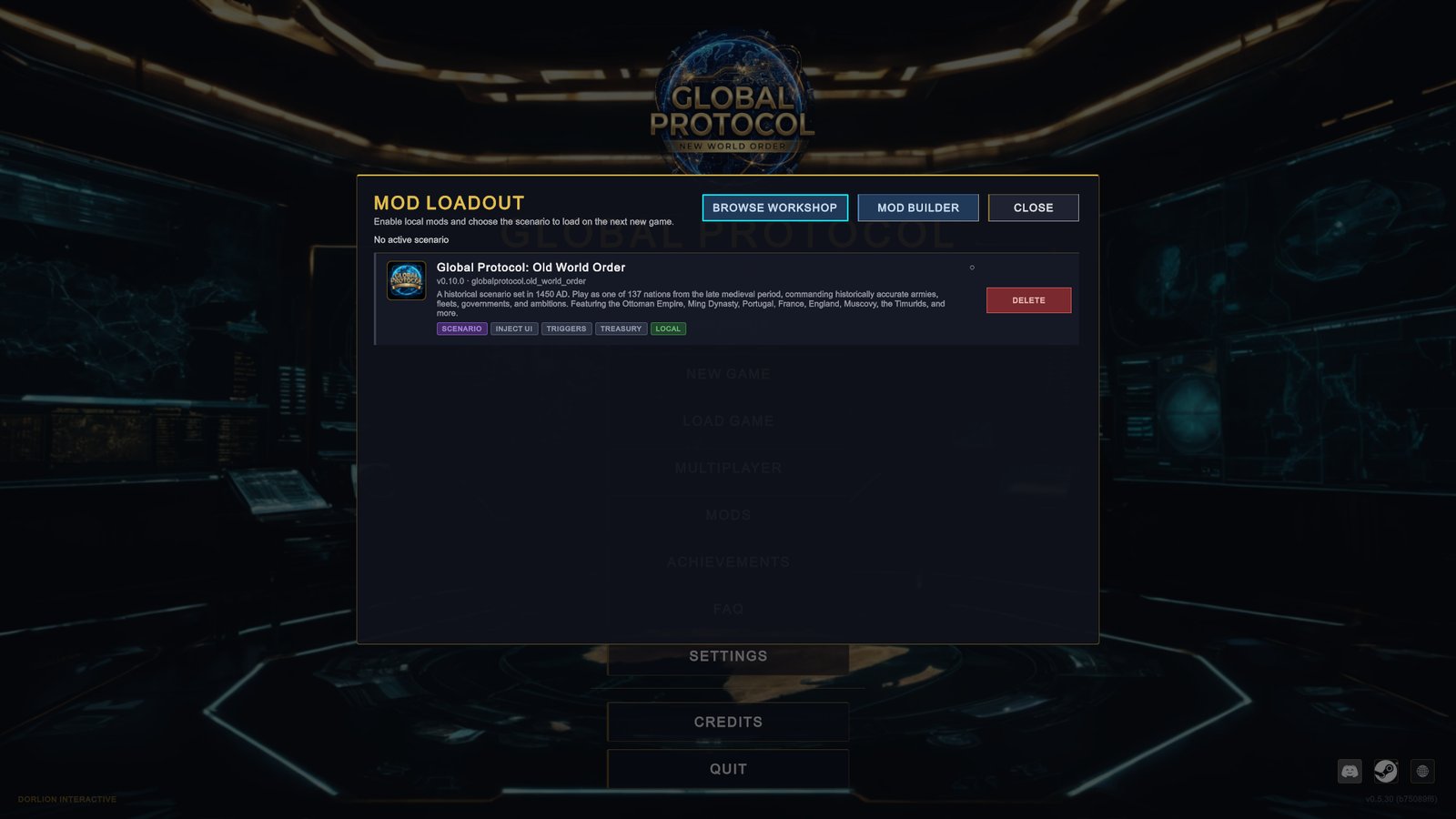
The panel lists every mod the game has found. Each row shows the mod’s name, version, description and a set of badges.
- Click a row to switch the mod on or off. A filled dot at the end of the row means on, an empty one means off.
- The line above the list names the scenario that will load, as “Active scenario:” and the mod’s name, or says “No active scenario”.
- VIEW opens the mod’s Workshop page. UNSUBSCRIBE removes a Workshop mod. DELETE removes a mod you installed by hand, files included.
- BROWSE WORKSHOP opens the in-game Workshop browser. MOD BUILDER opens the tool for making mods.
The badges tell you what a mod is before you enable it.
| Badge | Meaning |
|---|---|
| WORKSHOP or LOCAL | Where the mod came from: a Steam subscription or a folder on your computer |
| SCENARIO | The mod carries a scenario |
| SCRIPTED | The mod runs its own code |
| TREASURY, DIPLOMACY, ECONOMY, WORLD STATE, FLAGS, TRIGGERS, INJECT UI | What that code is allowed to read or change. NO PERMISSIONS means it asked for none. |
| NEEDS and a mod name | The mod depends on another mod that is missing or off. It will not load until you fix that. |
| FOR GAME and a version | The mod was made for another version of the game. It still loads. |
| LOAD ERROR | The mod failed to load. The game runs without it. |
Changes apply on a fresh start
Switching a mod on or off does not change the running game. A star appears on the MODS button and the panel says “Mod changes will apply after the next fresh start.” The new set is used when you click NEW GAME, which first reloads the game, or the next time you start the game.
Getting mods from the Steam Workshop
-
Open the browser. In the MOD LOADOUT panel click BROWSE WORKSHOP. The STEAM WORKSHOP screen lists community mods, sorted by POPULAR, RECENT or MOST SUBSCRIBED.
-
Subscribe. Click SUBSCRIBE on a mod. Steam downloads it, and the row shows the progress and then “Installed ✓”. OPEN IN STEAM opens the Workshop in Steam instead. A mod you subscribe to there arrives the same way.
-
Enable it. Go back to the MOD LOADOUT panel. The mod is in the list with a WORKSHOP badge. Click its row to switch it on.
-
Start a new game. Click NEW GAME. The game reloads with the mod and continues to the country select screen.
Old World Order is a good first try. It is a scenario on the Workshop that starts the world in 1450.
Installing a mod by hand
A mod that does not come from the Workshop is a folder. On Windows, put that folder inside Documents › GlobalProtocol › Mods, and create those folders if they do not exist. Unpack an archive first, so that the mod’s own folder sits directly inside Mods. The next time you open the panel, the mod is in the list with a LOCAL badge.
Load order
You do not arrange mods yourself. The game works out the order from what each mod says it depends on. The number in square brackets after a mod’s name is its position. Where two mods change the same thing, the one that loads later wins.
Choosing a scenario
A scenario is active when exactly one enabled mod carries the SCENARIO badge. The line above the list confirms which one. If you enable two scenario mods at once, no scenario is active, so switch off the one you do not want.
With a scenario active, NEW GAME opens the country select screen for that world. A country the scenario does not let you play is marked “Not playable in this scenario”. To go back to the standard 2026 world, switch the scenario mod off and start a new game.
Mods and saves
A save remembers the mods it was made with. The save list shows them on the Mods: line. You can load a save only with the same mods and the same scenario enabled. Otherwise the save is marked “This save requires the same enabled mods as when it was created.”
To load such a save, enable the mods it lists, restart the game, and then load it.
Mods and achievements
Achievements are earned only in the unmodded game. With any mod or scenario enabled, a campaign does not unlock them.
Mods in multiplayer
Every player needs the same mods as the host: the same set, the same versions, from the same source. The lobby room marks a player whose mods differ with a MOD MISMATCH badge and names the difference. See Multiplayer.
When a mod is missing or broken
- MISSING MODS at the bottom of the list names mods that were enabled but can no longer be found, for example after you unsubscribed. They are dropped from your selection. Subscribe or install them again if you need them for a save.
- A row that reads “Workshop item” and a number is a subscription that is still downloading. Wait for it to finish.
- A red bar saying that mods failed to load has three buttons. DETAILS lists what went wrong, COPY ERROR copies it for a bug report to the mod’s author, and OPEN LOG FOLDER opens the folder with the game’s log.
- A NEEDS badge names the mod to install or enable.
What to do
- Change one thing at a time. Enable a single mod, start a new game and look. If something breaks, you know which mod did it.
- Read the permission badges. A mod with TREASURY or DIPLOMACY can act on your game through its code. Enable such mods from authors you trust.
- Keep a note of the mod set for a long campaign. The save will not load without it, and an updated or removed Workshop mod can leave you stuck.
- Turn mods off for achievements. Switch everything off, then start a new game.
- Want to make one? The Modding section starts with What mods can change and Your first mod.