The console is a text prompt for looking under the bonnet: why the AI did something, which conditions an event is waiting for, what your economy looks like as a spreadsheet. The admin panel is a cheat window for single player that hands out money, research, buildings, infrastructure and resources. Neither is needed to play. Both are useful for testing, learning and recovering a campaign you would otherwise abandon.
Where to find it
- Console. Press the backquote key ` by default, the key under Esc on most keyboards. Press it again or press Esc to close. The key can be rebound under Settings › CONTROLS as Toggle Console.
- Admin panel. Open the console, type
adminand press Enter. Typeadminagain to close it.
How it works
The console
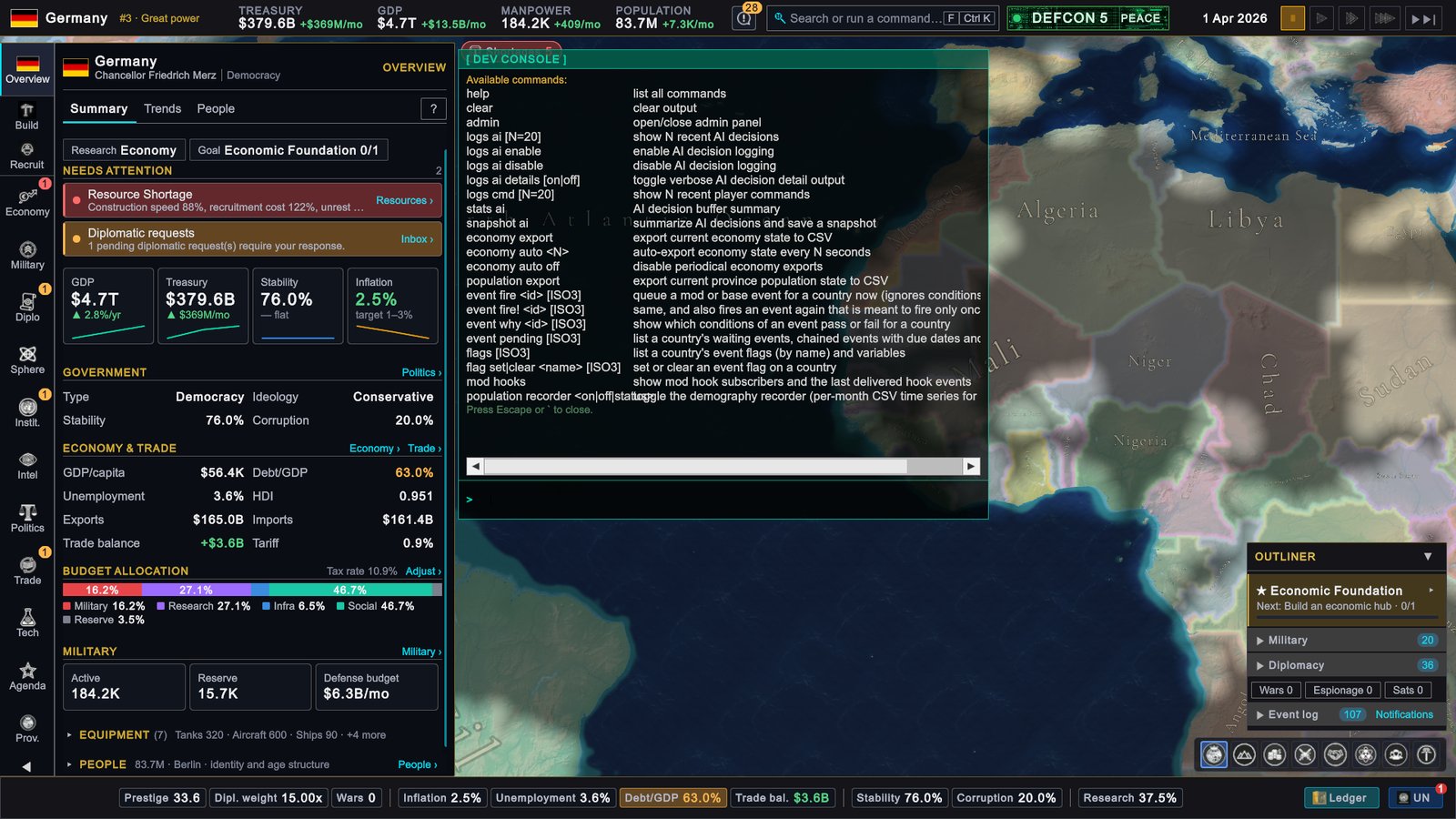
Type a command and press Enter. The first time you open the console it runs help for you. Command words are not case sensitive, but event ids are. While the console is open, the game’s hotkeys are off.
Several commands take a country as a three-letter code, written here as [ISO3], for example TUR or USA. Leave it out and the command uses your own country.
Commands that work in the released game
| Command | What it does |
|---|---|
help | Lists the commands. |
clear | Clears the console output. |
admin | Opens or closes the admin panel. Single player only. |
logs ai enable | Starts recording AI decisions. Recording is off by default in single player. |
logs ai disable | Stops recording. |
logs ai [N] | Shows the last N recorded AI decisions, 20 if you give no number, 200 at most. |
logs ai details on | Makes logs ai print the reasoning behind each decision. off returns to short lines. |
stats ai | Summarizes the recorded decisions: how many were logged and carried out, wars declared and alliances formed. |
snapshot ai | Writes the recorded decisions and a summary to two files and prints where they are. |
logs cmd [N] | Shows the last N recorded player orders, each with the game day it was given on. |
economy export | Writes the current state of the economy to a CSV file and prints its path. |
economy auto <seconds> | Repeats the export every so many seconds. economy auto off stops it. |
population export | Writes the population of every province to a CSV file and prints its path. |
event why <id> [ISO3] | Shows which conditions of an event pass or fail for a country. |
event pending [ISO3] | Lists a country’s waiting events, follow-up events with their due dates, and cooldowns. |
flags [ISO3] | Lists a country’s event flags and variables. |
mod hooks | Shows which mods listen to which game hooks, and the last hook events delivered. |
The event commands need an event’s internal id, which mod authors know from their own files. Be aware that event why and event pending reveal what is coming.
A group of commands starting with mp exists for tracing multiplayer synchronization problems together with the developers. help does not list them and they have no use in normal play.
Commands the released game refuses
help also lists a few commands that change the world. The released game answers them with “Refused”.
| Command | What it would do |
|---|---|
event fire <id> [ISO3] | Queue an event for a country at once |
event fire! <id> [ISO3] | The same, including an event that may only fire once |
flag set <name> [ISO3] and flag clear <name> [ISO3] | Set or clear an event flag |
Mod authors can fire their own events for testing from the Mod Builder, opened from the pause menu of a single player game.
In multiplayer
Read-only commands work in a multiplayer game. Two things change:
admindoes nothing. The admin panel does not open in multiplayer, because its edits would only happen on your machine and break the shared game.- AI decision recording stays on for the length of the session, so
logs ai disableonly takes effect once the session ends.
The admin panel
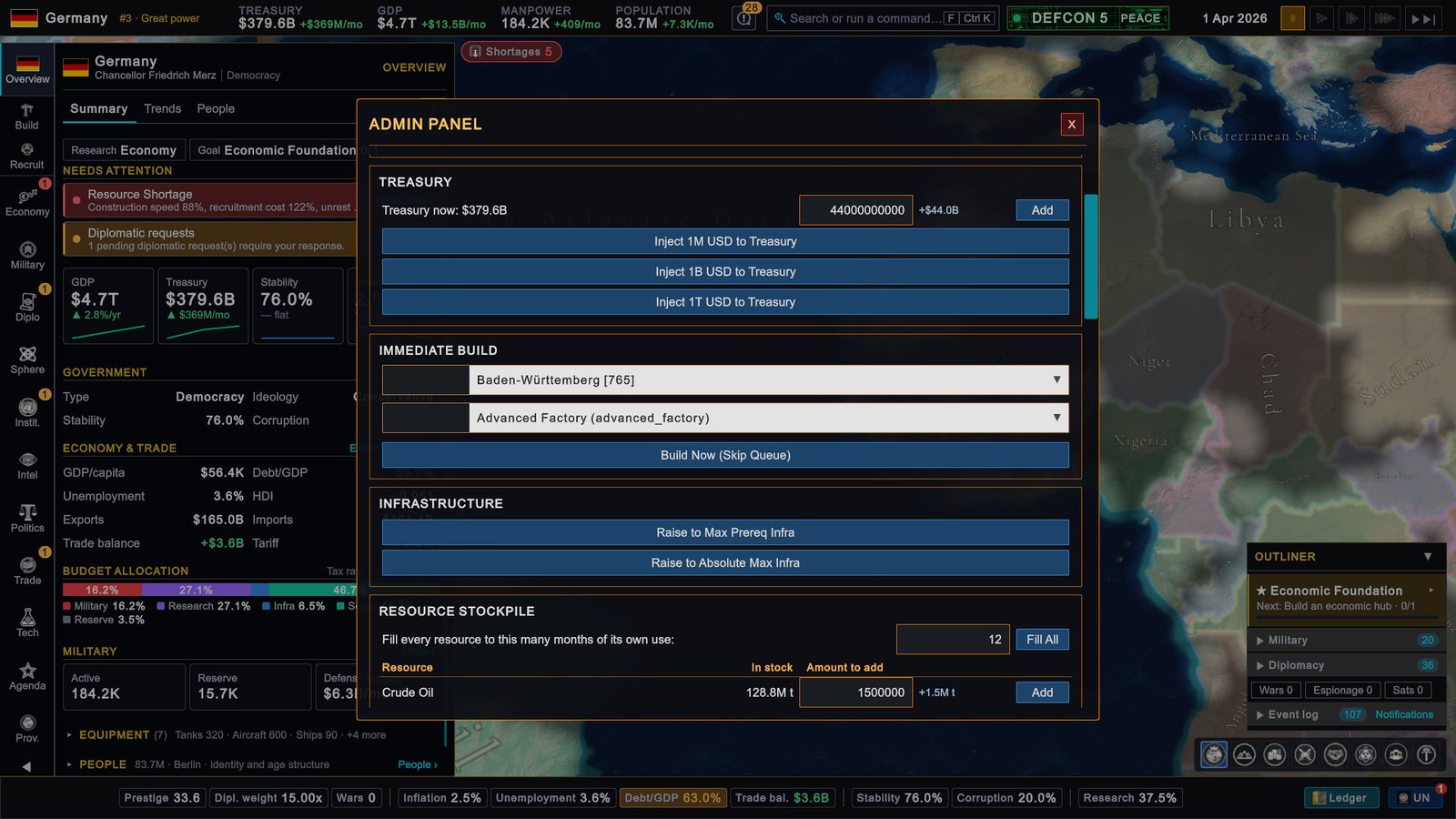
The panel acts on your own country. Tick Use Viewed Country at the top to act on the country you are currently looking at instead. Every change is immediate and cannot be undone, so save first.
| Section | What it does |
|---|---|
| RESEARCH | Unlock All Tech completes every research tier at once. It takes the first of the three choices in each tier, so you give up the choosing. |
| TREASURY | Shows the treasury now. Type an amount and click Add, or use the buttons that inject 1 million, 1 billion or 1 trillion dollars. |
| IMMEDIATE BUILD | Pick one of your provinces and a building, then click Build Now (Skip Queue). The building appears finished, at no cost and without the usual requirements. |
| INFRASTRUCTURE | Raise to Max Prereq Infra lifts every province you own to the highest infrastructure level any building asks for. Raise to Absolute Max Infra lifts them to the maximum. |
| RESOURCE STOCKPILE | Fill All tops up every resource you use to the number of months of use you typed. Each resource also has its own row with the stock now, an amount field and Add. A negative amount removes stock. |
A message at the bottom of the panel confirms each action or says why it failed. If the game is paused when you open the panel, it reminds you that time is not running. The edits themselves apply at once either way.
What to do
- Use
logs aito learn the AI. Runlogs ai enable, let a month pass, thenlogs ai 50withlogs ai details on. You see what countries decided and what weighed on the decision. - Use the exports for your own analysis.
economy exportat the start and the end of a year gives you two tables to compare in a spreadsheet. - Keep a clean save before you cheat. The admin panel has no undo, and a trillion dollars changes a campaign for good.
- Prefer Fill All to single resources when a shortage has stalled your economy. It gives each resource what you use and leaves the rest alone.
- Test builds, not balance. Immediate builds skip costs and requirements, so what you learn is what a building does, not whether you could afford it.