This page is a walkthrough you can play along with. It gives seven kinds of order on the first day, all while the game is paused, then runs one month and reads the result. Do the steps in this order and your screen will match the pictures.
Every number here comes from one played game as Australia. On 1 January your numbers should be the same. After the month has run they can differ, for example with another difficulty setting.
Before you start: the game is paused, the date reads 1 Jan 2026, and the guided tour is closed. If not, see Your first ten minutes.
1. Read the budget
You are about to spend money, so first see what you have. You change nothing in this stage.
-
Open the budget. Click Economy on the rail, the column of buttons on the far left, then the Budget tab (E opens Economy by default).
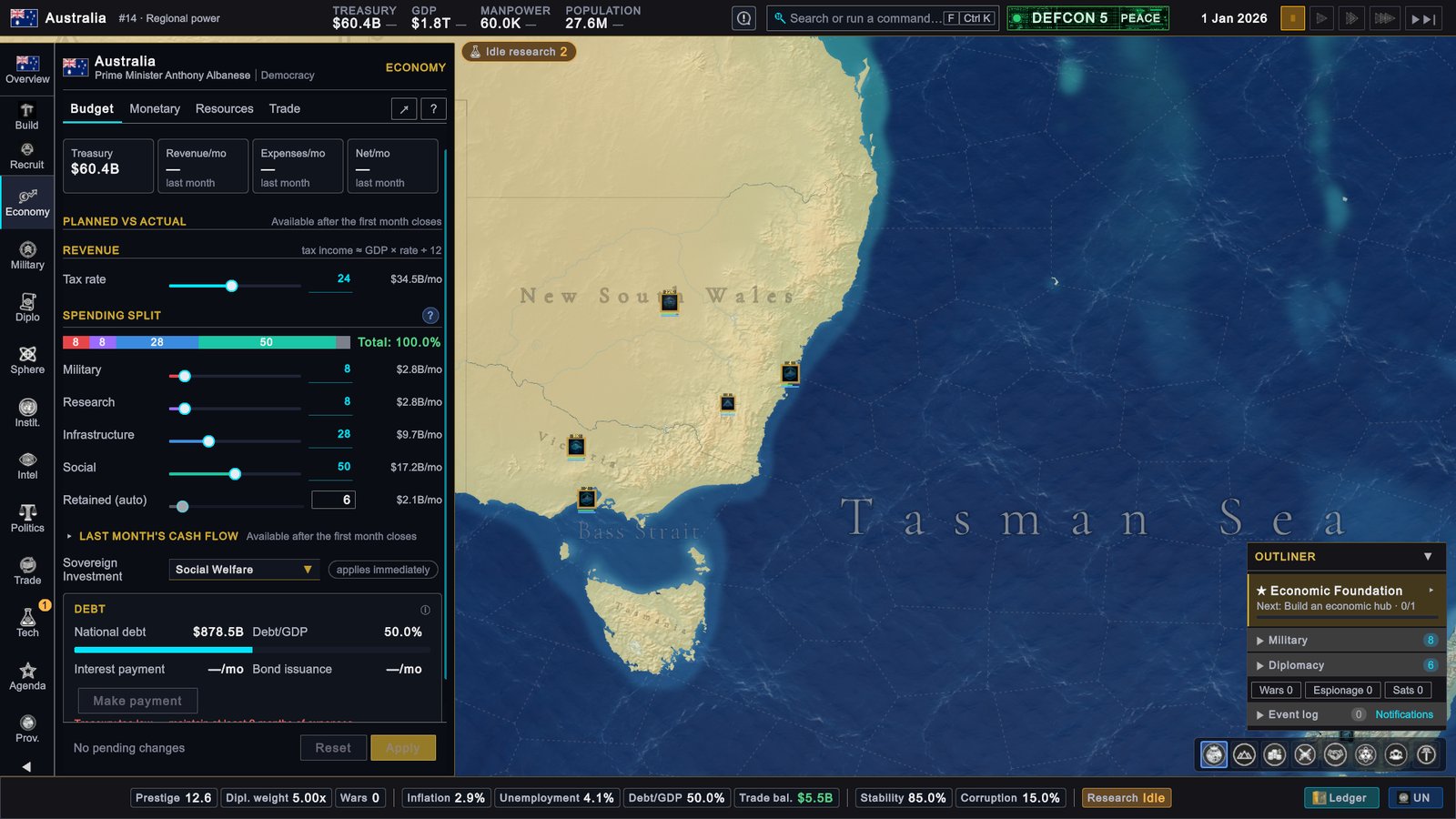
Australia, 1 January 2026: Economy › Budget on the first day. Three of the four tiles are still empty. -
Read the four tiles. Treasury shows $60.4B. The treasury is the money the state holds. Revenue/mo, Expenses/mo and Net/mo each show a dash and the words “last month”: no month has ended yet.
-
Read the tax line. Tax rate stands at 24, and the figure beside it is $34.5B/mo. That is roughly what taxes bring in each month. The page prints the rule itself: “tax income ≈ GDP × rate ÷ 12”. GDP is the yearly value of everything your country produces.
-
Read the spending split. Four sliders divide that income: Military 8 ($2.8B/mo), Research 8 ($2.8B/mo), Infrastructure 28 ($9.7B/mo) and Social 50 ($17.2B/mo). The line under them, Retained (auto) 6 ($2.1B/mo), is what the four leave over. It stays in the treasury.
-
Glance at the debt. National debt is $878.5B and Debt/GDP is 50.0%, which is half a year of GDP. The game starts to flag debt above 60%.
-
Change nothing. The bottom line reads “No pending changes”. Two parts of the page say “Available after the first month closes”. They fill in on 1 February.
Why it matters. Everything in the next stages is paid from the treasury. You know that $60.4B is in the bank and that the plan leaves about $2.1B a month over. Costs outside the split, such as the purchases below, come on top of the plan. The Overview page shows the same split with one decimal (tax rate 23.6%, research 7.9%, infrastructure 28.1%). More in Budget, taxes and debt.
2. Queue your first building
Your tracked goal, Economic Foundation, has one step: “Build an economic hub”. The Agenda page explains it as “Complete 1 new commercial district, trade port, factory or tech park.” This stage queues a tech park.
-
Click Build on the rail. The page widens and shows Recommendations, a list of suggested buildings with the province for each. A province is one of the areas your country is divided into. This list is a view inside Provinces › Construction.
-
Do not take the first suggestion yet. As the list opens, the first suggestion in this game was a Barracks in Tasmania. A Barracks is a military building. It does not count for the goal.
-
Click Economy Focus. It is in the row that starts with Target:. The list is worked out again for the economy. The first row in this game suggested a Technology Park in New South Wales, and a Technology Park is a tech park for the goal.
-
Click + Queue on the first row. A toast, a small message at the top right, confirms it: “Technology Park queued in New South Wales.” The section CONSTRUCTION QUEUE in the same view reads “1 active”, with the province, the building and 0%.
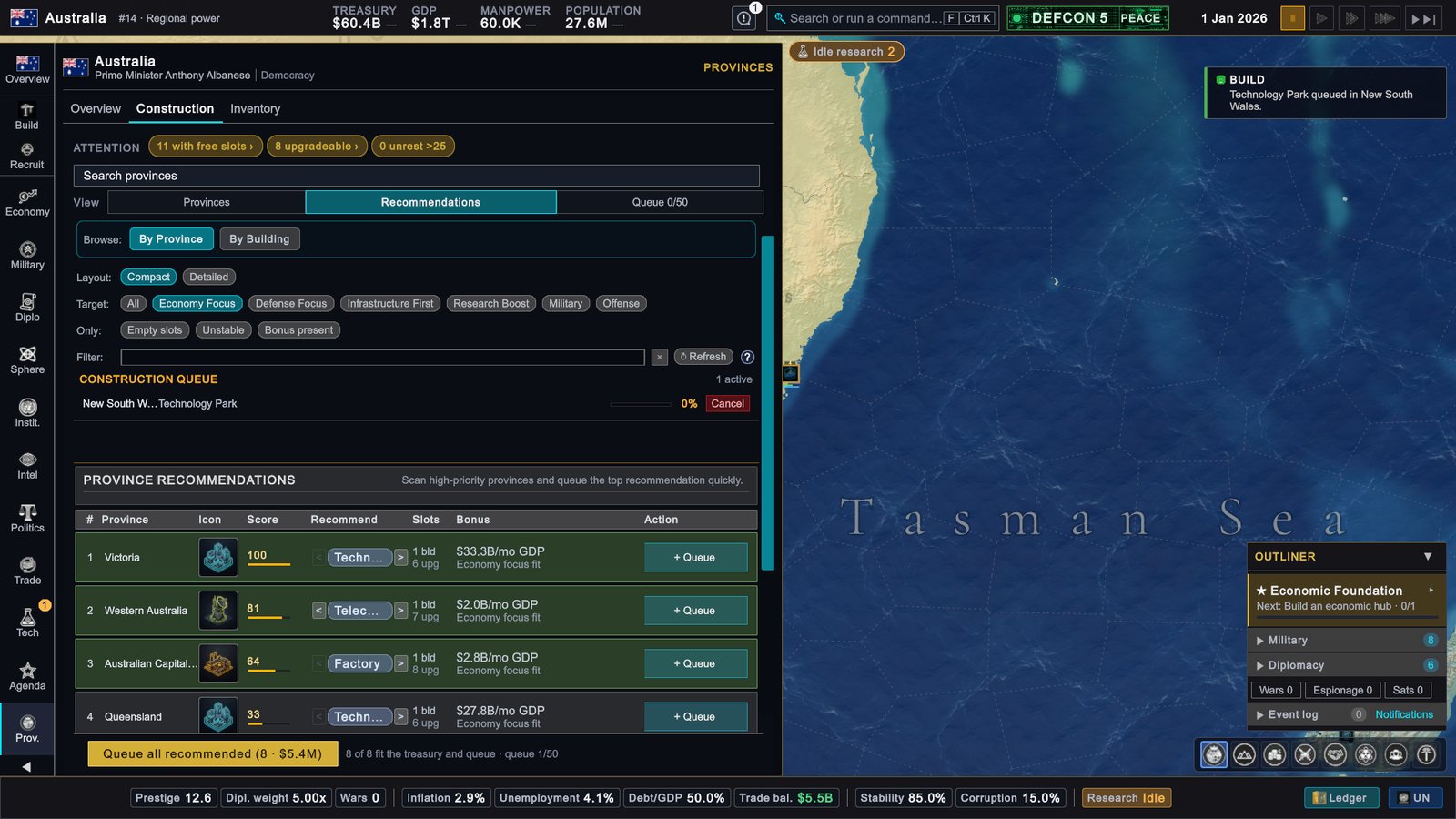
Australia, 1 January 2026: Recommendations with Economy Focus, after the click. New South Wales is in the queue, so the list has moved on and Victoria is first. -
Look at it in the queue. Click Queue in the row that starts with View. The button reads Queue 1/50: one project out of the fifty a country can run at once. The entry says Technology Park, New South Wales, 0% and “ETA 7.1 mo”, about seven months until it is finished.
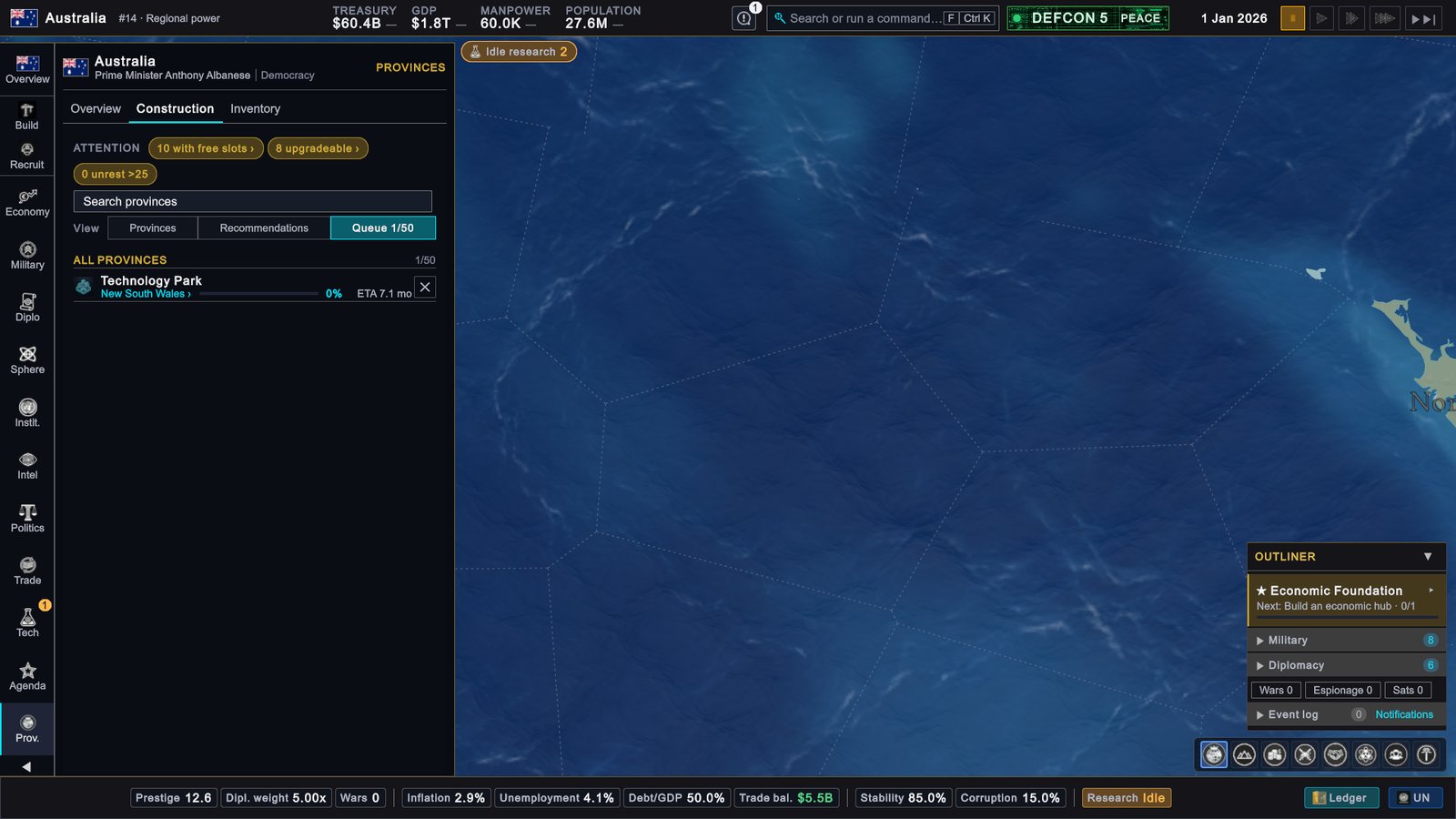
Australia, 1 January 2026: the queue with the first building in it.
Why it matters. A building is paid for when you queue it and starts working when it is finished. The price here is small: the button at the bottom of the list offered all eight suggestions together for $5.4M, against a treasury of $60.4B. Leave that button alone for the moment. One building is enough to learn with.
The goal still shows 0/1. The step asks for a completed building, so it turns to 1/1 after construction ends. In the list, long building names are cut short: “Techn…” is the Technology Park. More in Buildings and construction.
3. Find a shortage and buy cover
A resource is a good your economy makes and uses, such as steel or wheat. A shortage means you use more of it each month than you make.
-
Open the resource list. Click Economy on the rail, then the Resources tab.
-
Click Shortages. The chip is at the top of the list. In this game it carried the number 33.
-
Click the Refined Petroleum row. It is the first row, and it unfolds.
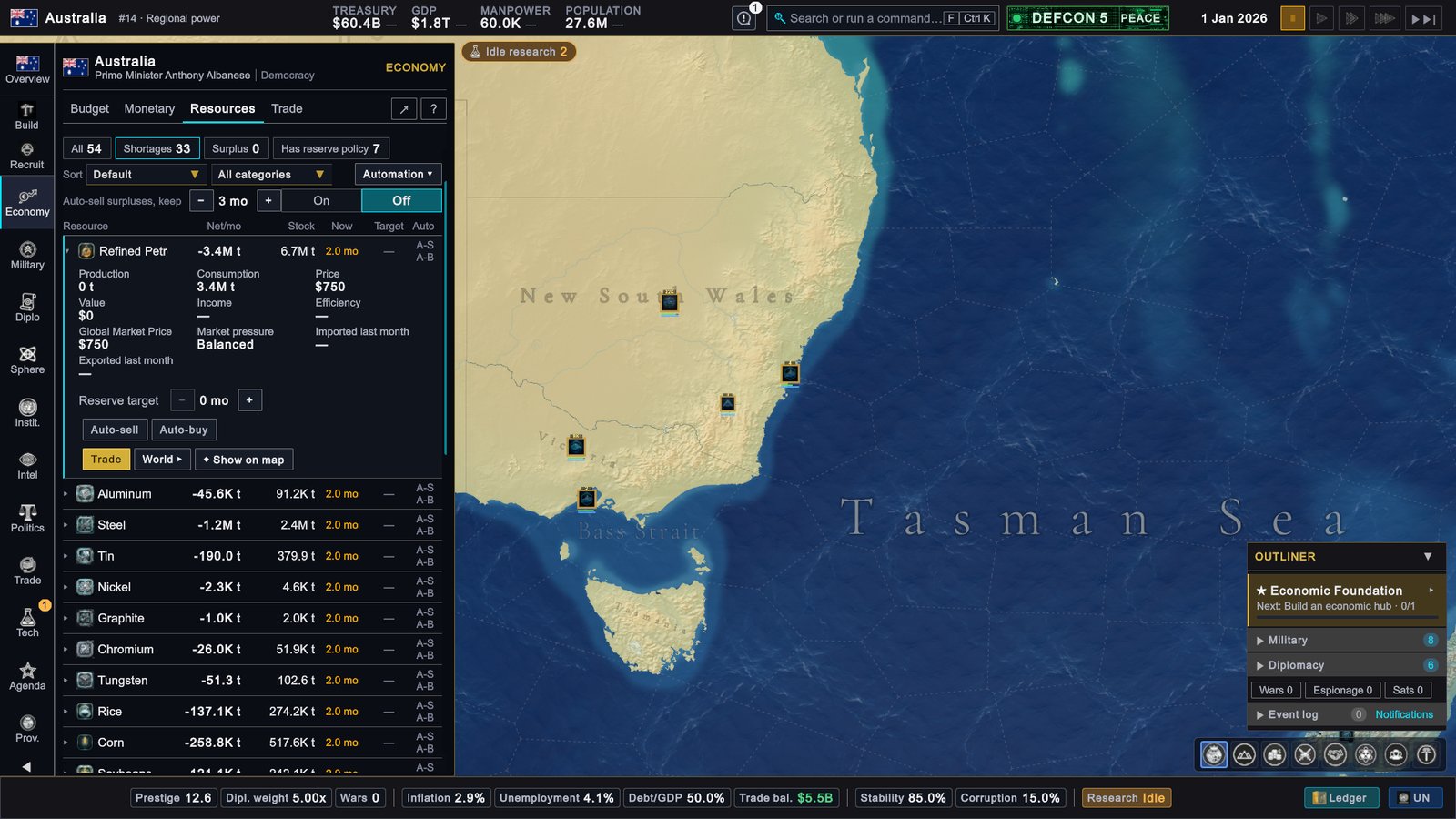
Australia, 1 January 2026: Economy › Resources with the Shortages filter on and Refined Petroleum unfolded. -
Read the row. Net/mo is -3.4M t: you are 3.4 million tonnes short every month. Stock is 6.7M t. Now is 2.0 mo: the stock covers two months of use. Inside the row, Production is 0 t and Consumption is 3.4M t. Australia makes none of it.
Thirty-three shortages look alarming. They are not an emergency. In the game, a gap is drawn from the stock, and your companies also import what the economy is short of by themselves. The treasury does not pay for those imports. The shortages that carry a direct penalty are listed in Resources and goods. Refined Petroleum is an input for other industries, and factories that run short of an input produce less. One purchase is a safe way to learn the trade screen.
-
Open Buy/Sell. Click Trade on the rail, then the Buy/Sell tab (X opens Trade by default).
-
Choose the resource. In the card Your order, open the Resource box and choose Refined Petroleum. Make sure Buy and Trade with a country are selected.
-
Take the suggested amount. Click the button Suggested: 3.4M t. The line under it says where the figure comes from: “Suggested from your remaining monthly gap after contracts.”
-
Read the list of sellers. Each row is a country that can spare the resource: how much it has (Available), the price per tonne brought to your door (Delivered) and the Route. India was first: 71.6M t, $823.38 / t, by sea. The line above the list explains the order: “Curaçao has the cheapest goods, but India is cheapest once freight is added.” Freight is the cost of shipping.
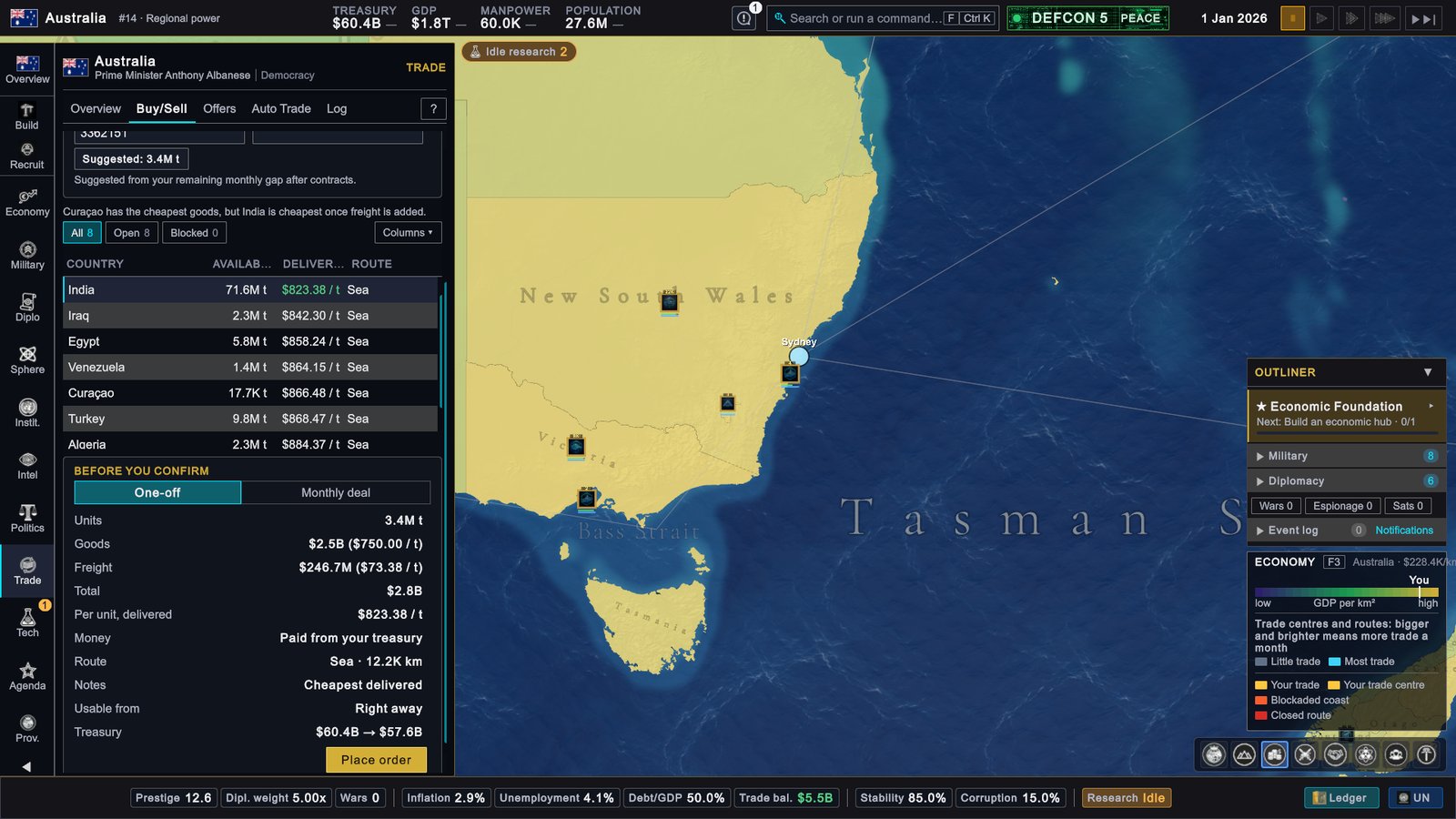
Australia, 1 January 2026: Trade › Buy/Sell before the order. India is the cheapest seller once freight is counted. -
Read Before you confirm. The card is filled in for India. One-off is selected, which means a single purchase. Goods $2.5B ($750.00 / t), Freight $246.7M ($73.38 / t), Total $2.8B. Usable from says “Right away”. The last line is the one to check every time: Treasury $60.4B → $57.6B.
-
Click Place order. If an order is worth more than a twentieth of your treasury, the game asks you to confirm first. This one is not.
-
See that it happened. India’s Available drops from 71.6M t to 68.2M t. The Treasury line then reads $57.6B → $54.9B, because the card is ready for a second order of the same size. Do not click again.
-
Open the Log tab. It lists one trade: 01/2026, Refined Petroleum, India, 3.4M t, -$2.8B.
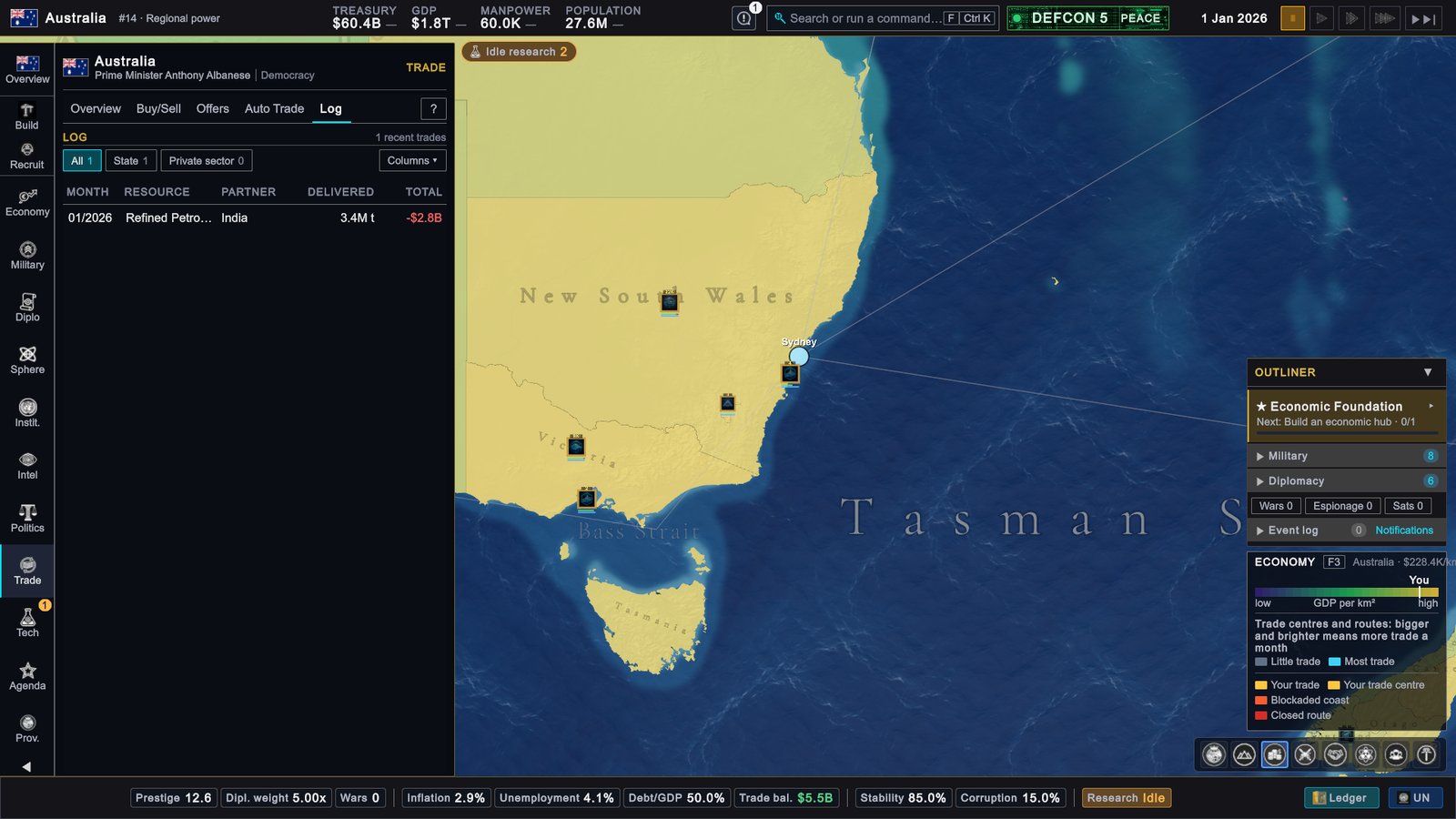
Australia, 1 January 2026: Trade › Log with the first order in it.
Why it matters. You have bought one month of use, so the stock lasts longer. You have also seen the rule of every purchase: the price that counts is the delivered one, and the card tells you what the treasury will be before you click. In this game the top bar caught up a few steps later, so the next pictures still show $60.4B there. More in Trade.
4. Look at a neighbour and send a diplomat
Relations are how warmly one country regards another, from -100 to +100. Australia has no land borders. This stage looks at Indonesia, which lies across the sea to the north.
-
Open the list of countries. Click Diplomacy on the rail (the button reads Diplo), then the Relations tab. The countries are grouped: Friendly (+50 and above), Warm (+20 to +49), Neutral, Cold and Hostile. In this game the United States was at the top of the Friendly group with +80.
-
Find Indonesia. It is in the Warm group, folded away behind the line “2 more warm”. Click that line to unfold it, then click the Indonesia row. You can also click Indonesia on the map.
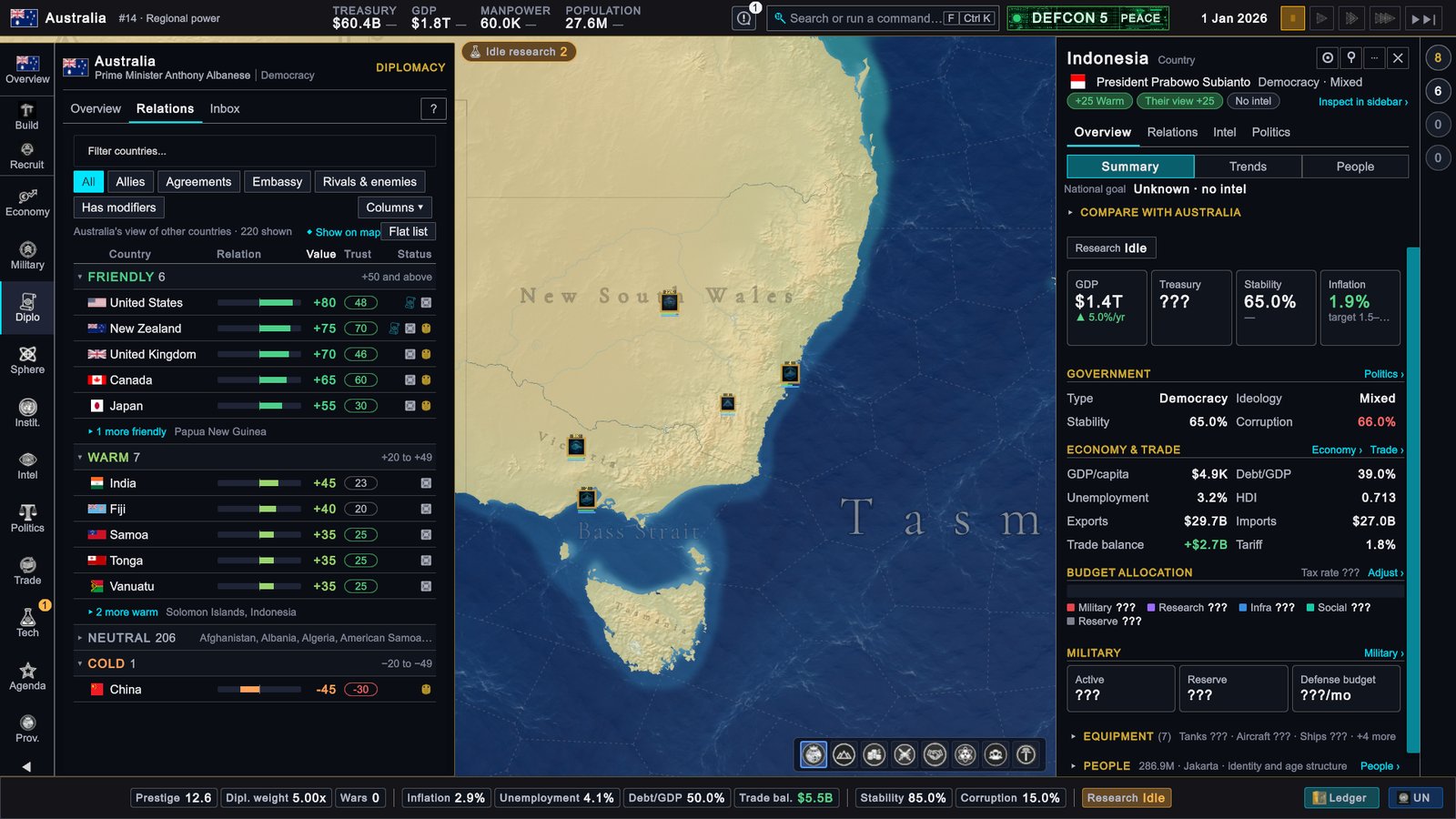
Australia, 1 January 2026: Diplomacy › Relations, with Indonesia's card open on the right. -
Read the card. It opens on the right. Under the name are three labels: “+25 Warm” (your view of them), “Their view +25” and “No intel”. Several values read ”???”: you have no intelligence on Indonesia, so the game does not show them.
-
Click the Relations tab on the card. Find the group RELATIONS and click IMPROVE RELATIONS.
-
Confirm. A small window titled CONFIRMATION asks: “Send a diplomat to improve relations with Indonesia?” Click YES.
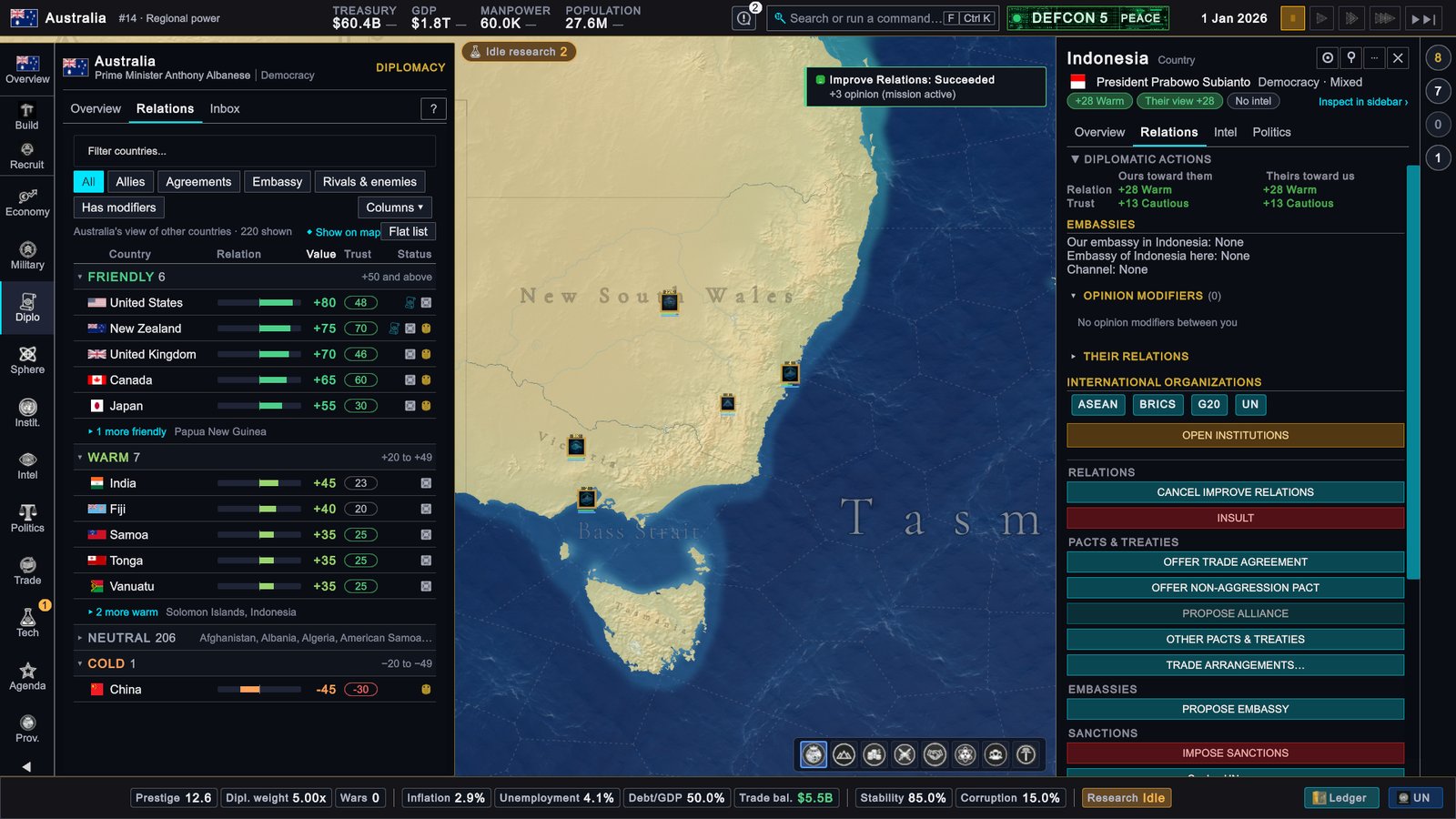
Australia, 1 January 2026: after YES. The relation is +28 in both directions and the button has become CANCEL IMPROVE RELATIONS. -
Read the result. A toast says “Improve Relations: Succeeded” and “+3 opinion (mission active)”. Both labels on the card read +28. The button has changed to CANCEL IMPROVE RELATIONS. Leave it.
-
Close the card with the ✕ in its top right corner.
Why it matters. Sending a diplomat costs nothing. The relation rises a few points at once, and the mission then keeps adding to it for 180 days. A country that likes you trades with you more readily and is less likely to plan a war against you. You can ignore the other buttons on the card for the moment. More in Relations, trust and opinion.
5. Recruit a first unit
A unit is one piece of your armed forces: an army unit, a ship or an air wing. Australia already has forces. The Military row of the outliner, the list panel in the lower right corner, counted 8 entries in this game.
-
Click Recruit on the rail. It opens Military › Recruit.
-
Look at the three buttons. They read Land 0/7 ready, Naval 6/6 ready and Air 4/4 ready. The numbers say how many unit types you can order.
-
Understand the zero. Australia has no land unit available on the first day. The cards under Land say why: “Needs Barracks · 0 eligible”. A land unit is trained in a province that has the right building, for most of them a Barracks, and Australia starts without one. So this walkthrough orders a ship.
-
Click Naval 6/6 ready. The first card is the Patrol Boat: ATK 8, DEF 8, HP 70 (attack, defence and how much damage it can take), then $200.0M, MP 600 and 4 mo. MP is manpower, the people the unit takes from your pool of recruits. It is the cheapest ship in the list.
-
Click Recruit → New South Wales on the Patrol Boat card. The province is chosen for you. The top of the page says why: the game picks the best province that has what the unit needs, and a ship needs a Naval Base.
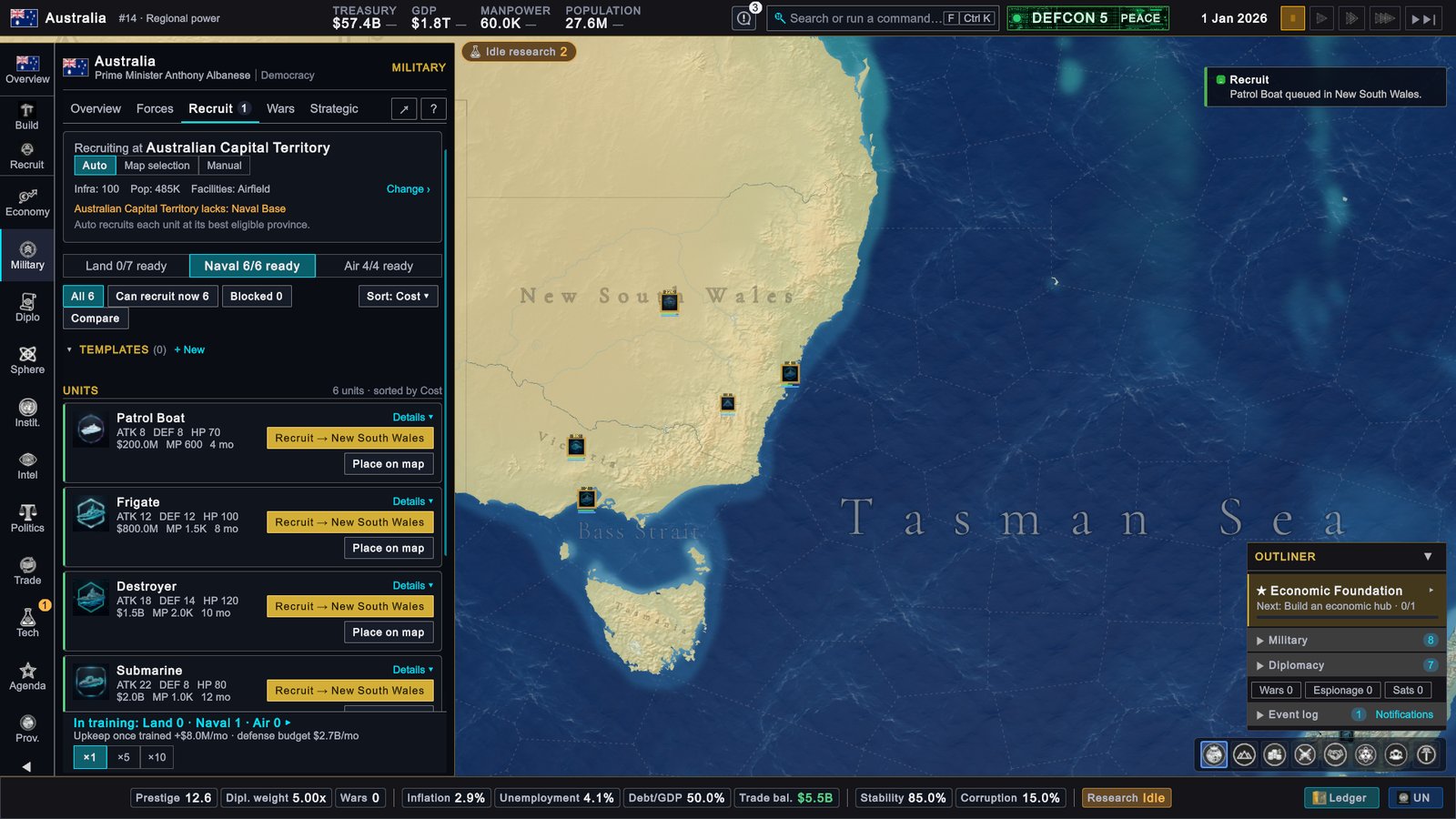
Australia, 1 January 2026: Military › Recruit after ordering one Patrol Boat. -
Read the result. A toast says “Patrol Boat queued in New South Wales.” The line at the bottom reads “In training: Land 0 · Naval 1 · Air 0”. Under it: “Upkeep once trained +$8.0M/mo”. Upkeep is the monthly cost of keeping a unit.
Why it matters. A unit is paid for when you order it, takes manpower, needs months of training, and costs upkeep for as long as it exists. The top bar read TREASURY $57.4B at this point: $60.4B less the $2.8B of petroleum and the $200.0M boat. To recruit land units later, build a Barracks first. More in Land forces and Navy.
6. Start a first research
Research in Global Protocol means choosing doctrines. A doctrine is a long-term policy for your country. There are ten branches, such as Economy and Military. Each branch has five tiers, each tier offers three doctrines, and you take one of the three.
-
Open Technology. Click Technology on the rail (the button reads Tech; T by default). The page reads “RESEARCH SLOTS 0/2 active”: you can research two things at once and both slots are empty.
-
Click ↗ Open Knowledge Network. A full-screen workspace titled Knowledge Network opens.
-
Click Economy in the list of branches on the left. The middle of the screen shows the first tier, Macroeconomic Framework, and its question: “What macroeconomic priority should guide national policy?” Under it are three cards.
-
Read the three cards. Each costs “400 RP · 8 mo”: 400 research points and at least eight months. Each lists what it improves and what it worsens. Growth-First Economics reads: Inflation Pressure +30%, Sovereign Investment Efficiency +10%, Debt Interest +15%, GDP +0.9%. The other two are Price Stability Mandate and Fiscal Discipline.
-
Click a card, then Begin Research. This walkthrough takes Growth-First Economics. The right column fills in under Selected Doctrine, with the line “Starts in slot 1 · permanent, locks out 2 picks”. Begin Research is under it.
-
Read the confirmation and click Confirm. The window is titled Confirm Doctrine Choice. It says: “This choice is permanent for this campaign.” It then lists what you give up: Price Stability Mandate and Fiscal Discipline.
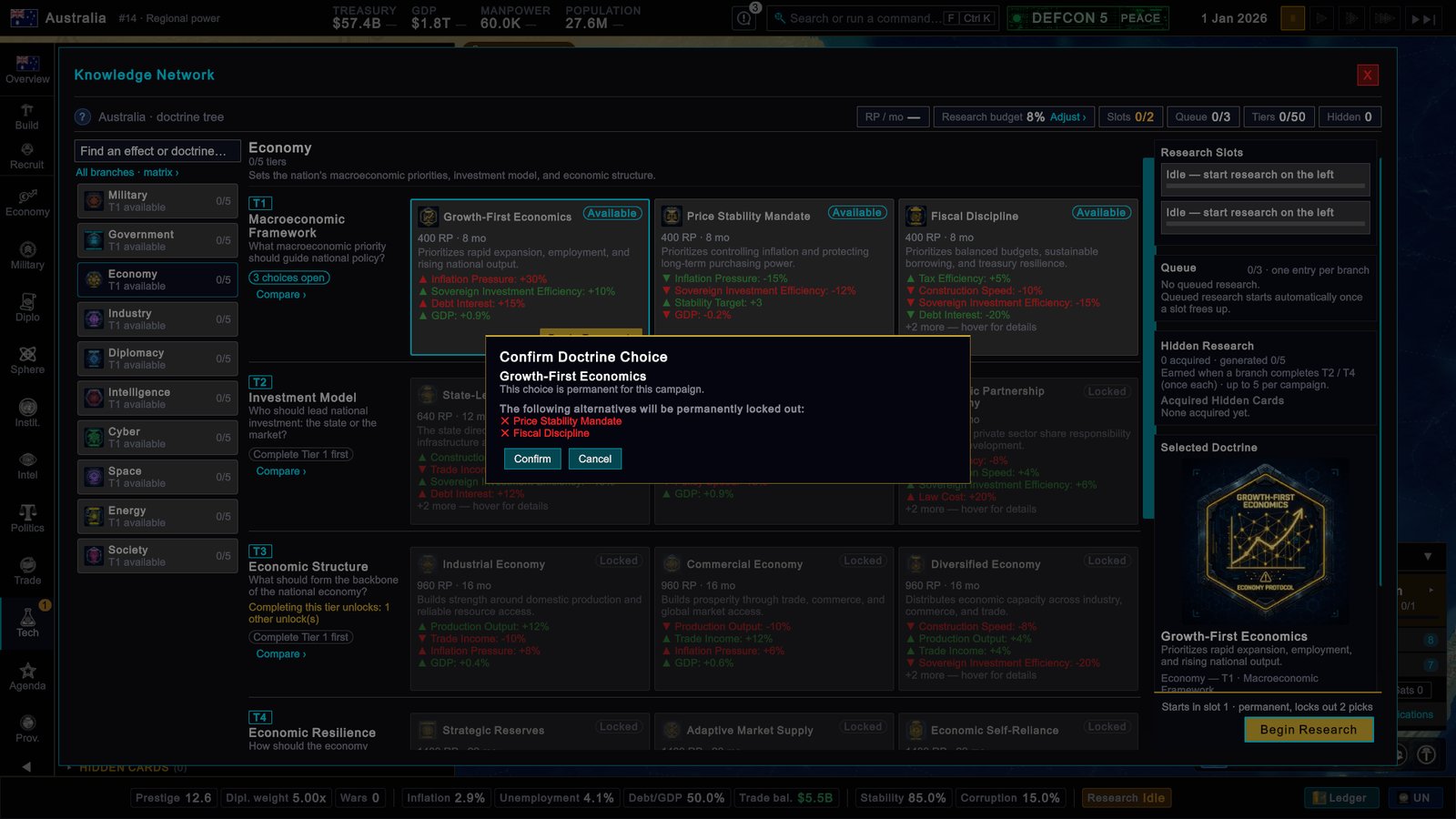
Australia, 1 January 2026: the confirmation for a first doctrine. It names the two doctrines you give up. -
Close the workspace with the X in its top right corner. The Technology page then reads “RESEARCH SLOTS 1/2 active”. Slot 1 shows Growth-First Economics, 0% and “0 / 400 RP”.
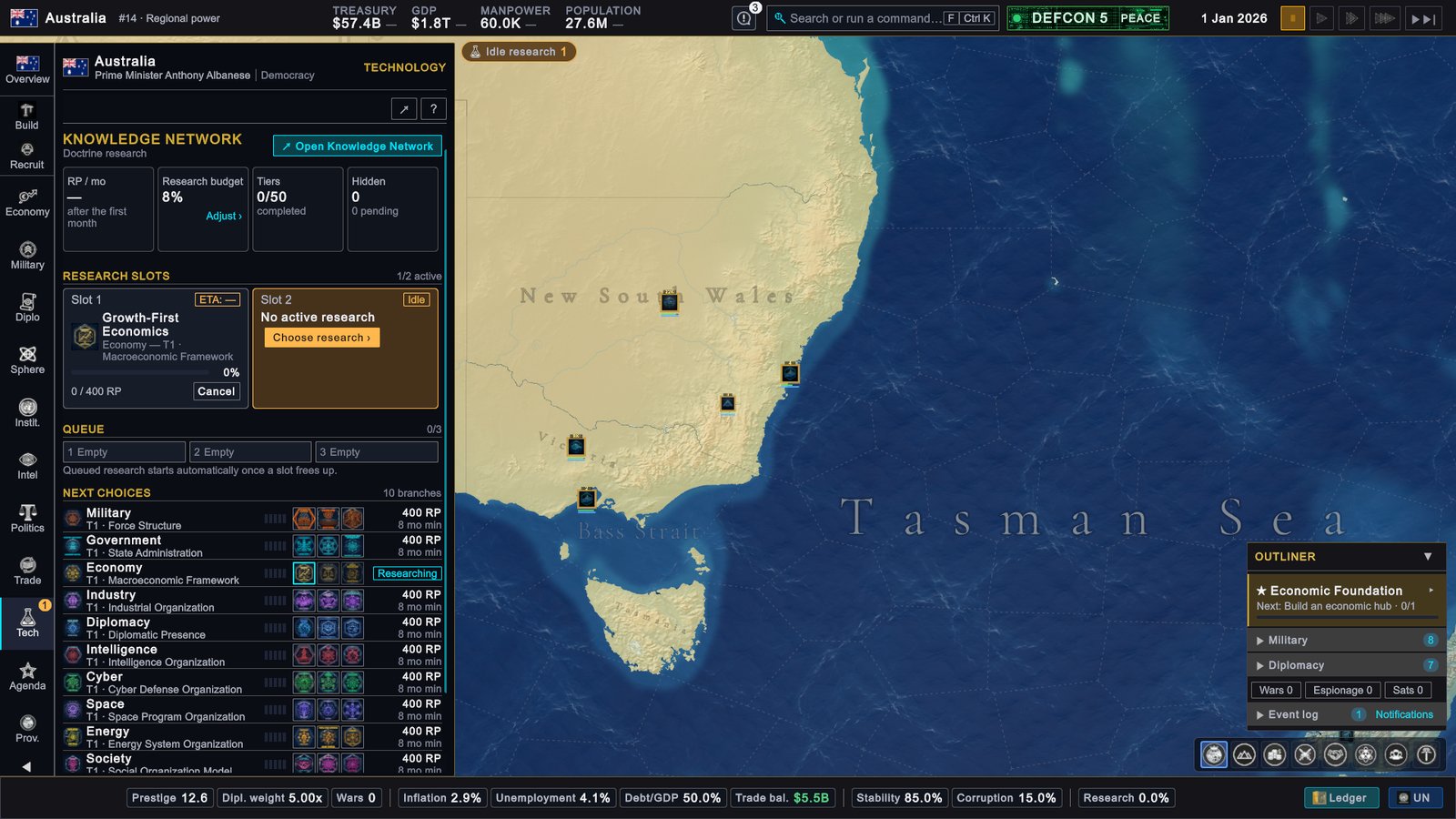
Australia, 1 January 2026: the Technology page with slot 1 researching.
This choice is permanent. When the tier is finished, your doctrine stays for the rest of the game and the other two are gone. Until then the slot has a Cancel button. It throws away the progress and opens the tier again. Read the three cards before you confirm.
Why it matters. Research is slow, and money does not rush it: a first tier takes at least eight months however much you spend. Starting on the first day costs nothing extra and wastes no time. The second slot is still empty, which is why the Idle research label stays at the top of the map with a 1. Fill it the same way with a doctrine from another branch when you feel ready. More in Knowledge Network.
7. Skip to the next month and read what changed
All orders are given. Time can pass.
-
Go back to Overview. Click Overview on the rail.
-
Click Skip to next month. It is the last of the five buttons in the top right corner. Its tooltip reads: “Runs at top speed and pauses on the 1st, when buildings, research and budgets are processed.”
-
Wait. The days run by and the game pauses itself on 1 Feb 2026. If a popup stops the game on the way, read it and answer it. If the clock does not start again afterwards, click the button once more.
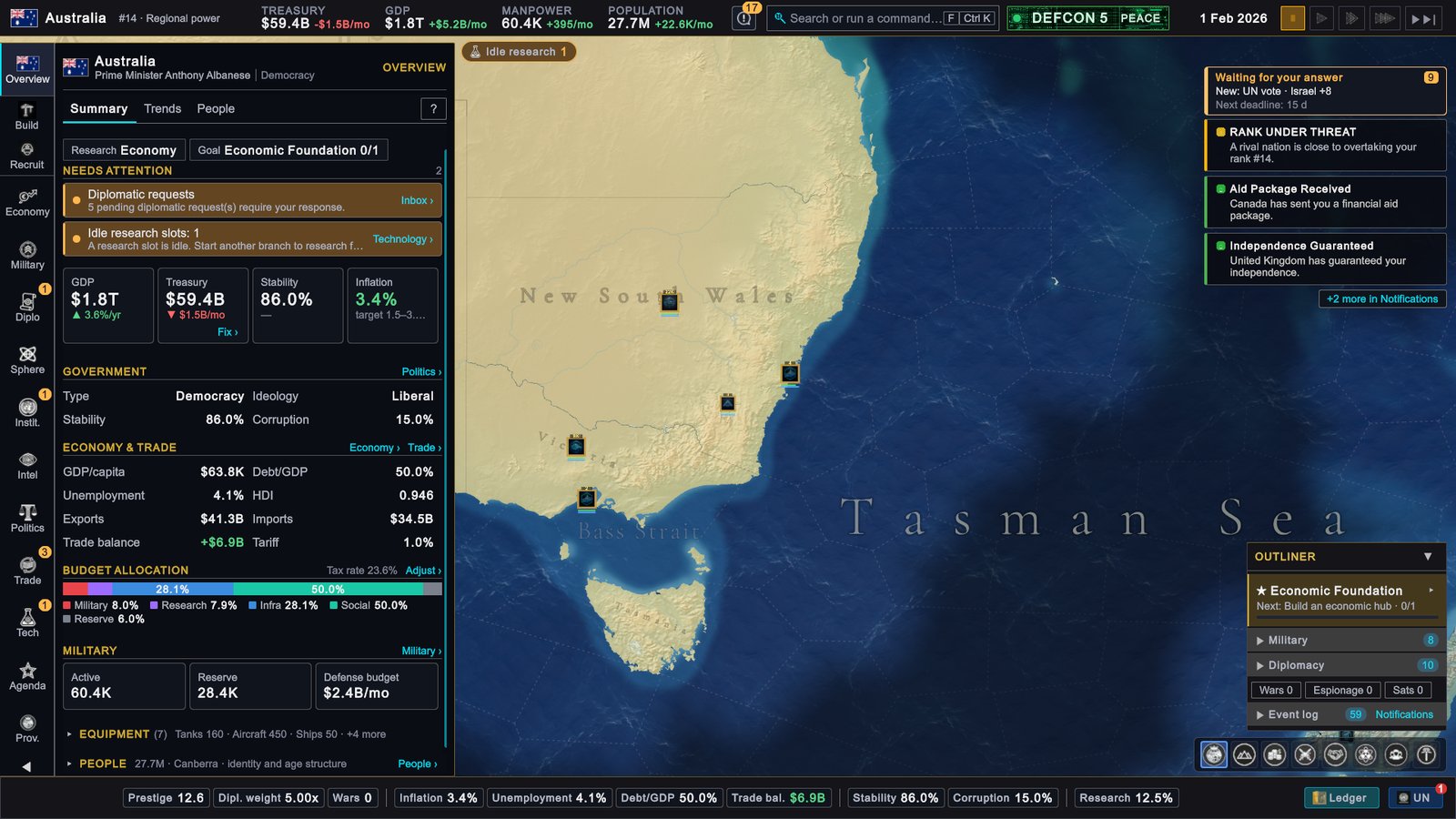
Australia, 1 February 2026: the first of February. Every figure in the top bar has a monthly change beside it.
Read the screen from the top. In this game it showed:
| Where | What it showed | What it means |
|---|---|---|
| Top bar, TREASURY | $59.4B, -$1.5B/mo in red | The first month cost more than it brought in. January included the purchases of stages 3 and 5. |
| Top bar, GDP | $1.8T, +$5.2B/mo | The economy grew. |
| Top bar, MANPOWER and POPULATION | 60.4K, +395/mo and 27.7M, +22.6K/mo | Both rose a little. |
| Treasury tile on Overview | ▼ $1.5B/mo and a link, Fix › | The link appears after a month that lost money. It opens the budget. |
| Stability and Inflation tiles | 86.0%, and 3.4% with target 1.5–3.5% | Stability rose a point. Inflation rose but is inside the target. |
| Needs attention | ”Diplomatic requests” and “Idle research slots: 1” | Other countries have written to you, and one research slot is still empty. |
| Status bar, Research | 12.5% | Your doctrine is one eighth done. |
| Outliner | ★ Economic Foundation, still 0/1 | The Technology Park is not finished yet. |
On the right are the messages:
- Waiting for your answer, with a 9 and “Next deadline: 15 d”. Other countries have sent proposals that need a yes or no. A request you ignore lapses at its deadline. Nothing here has to be answered today. The next page shows how.
- RANK UNDER THREAT: “A rival nation is close to overtaking your rank #14.” This is information. You can ignore it.
- Aid Package Received: “Canada has sent you a financial aid package.” A gift of money.
- Independence Guaranteed: “United Kingdom has guaranteed your independence.” A guarantee is one country’s promise to join the war if another is attacked.
- “+2 more in Notifications”. Click the bell in the top bar to read them all.
A red number in the top bar after the first month is not an emergency. To see where the money went, open Economy › Budget and click Last month’s cash flow, which has filled in. In this game the same figure read +$1.5B/mo two months later.
What you have set in motion
| What you started | What the screen said | When it pays off |
|---|---|---|
| A Technology Park in New South Wales | 0%, “ETA 7.1 mo” | In about seven months. When it is finished, the step of Economic Foundation turns to 1/1. |
| 3.4M t of Refined Petroleum from India | ”Usable from: Right away” | At once: about one more month of stock. |
| A diplomat to Indonesia | ”+3 opinion (mission active)”, relation +28 | The mission runs for 180 days and keeps raising the relation. |
| A Patrol Boat | ”4 mo”, “In training: Naval 1” | In four months. From then on it costs $8.0M a month in upkeep. |
| The doctrine Growth-First Economics | ”0 / 400 RP”, then 12.5% on 1 February | After eight months at the earliest. Research points arrive every month, mostly from the Research share of the budget. |
Save the game before you go on: press Esc (by default), click SAVE GAME, type a name and click SAVE. Time, speed and saving has the details.
If your screen looks different
- You play another country. The steps are the same, the names and numbers are not. Your first suggestion under Economy Focus may be another building; check that it is a commercial district, trade port, factory or tech park. Your shortages are other resources. If your Land button shows units ready, recruit a land unit in place of the ship.
- Your first suggestion is not a Technology Park. The Target: row is not on Economy Focus, or you already queued one and the list has moved on.
- The sellers or prices differ. The list changes with what other countries have to spare. Take the first row and read Before you confirm.
- February looks different. The messages depend on what other countries decided during the month. The parts of the screen and what they mean are the same.
Next
Your first year: what to aim for between February and the first 1 January.