This tutorial builds a complete mod by hand and ends with it running in your game. The mod is Project Atlantis: a new landmass rises in the Atlantic, you decide whether to send an expedition, and a month later the expedition reports back. It is four small text files, with no script and no permissions.
You need the full game and a plain text editor. If you would rather click than type, the Mod Builder can make the same mod through forms. Reading this page first will tell you what its forms are writing.
What you will build
atlas_01, “A Continent Rises”. A popup for the player, once per game, at the first monthly event check from June 2026. It has two options. Send an expedition marks your country with a flag and queues the second event for a month later. Leave it to the scientists marks a different flag and ends the story.atlas_02, “The Expedition Returns”. A follow-up that only the first event can start.
The folder you are going to make looks like this:
example.atlantis/
  mod.json
  Content/
    events/
      atlantis.json
    localization/
      en.csv
      tr.csv
Every file is printed in full below. The finished folder is also in the public Old World Order repository, under docs/modding/examples/atlantis, if you would rather download it and read along.
Step 1: the folder
-
Find a mods folder. On Windows the game reads mods from three folders of your own. Use the first:
%USERPROFILE%\AppData\LocalLow\Dorlion Interactive\Global Protocol\Mods\. Paste that path into the address bar of File Explorer, and create theModsfolder if it is not there yet. The other two are listed on What mods can change. -
Create the mod’s folder. Inside
Mods, make a folder namedexample.atlantis. That is the mod’s id. Naming the folder after the id makes a duplicate copy stand out, and the Mod Builder’s check warns when the two differ. -
Create the subfolders. Inside
example.atlantis, makeContent, and inside thateventsandlocalization. The capital C inContentis part of the name.
Save every file in this tutorial as UTF-8 text. On Windows, check that the names end in .json and .csv and not in .json.txt.
Step 2: mod.json
Every mod has a manifest called mod.json at the top of its folder. Create example.atlantis\mod.json with this content:
{
  "id": "example.atlantis",
  "displayName": "Project Atlantis (example)",
  "version": "1.0.0",
  "description": "Example of data-driven mod events: a two-event chain for the player on top of the standard 2026 campaign. No scripts and no permissions needed.",
  "enabledByDefault": false
}| Field | What it does |
|---|---|
id | The mod’s unique id. Use lowercase letters and numbers, with dots, dashes or underscores between the parts. Saves and multiplayer lobbies identify the mod by it, so do not change it after you share the mod. Required. |
displayName | The name players see in the mod list. Required. |
version | Three numbers, MAJOR.MINOR.PATCH. A multiplayer lobby compares it between players, and other mods can depend on a version range of yours. Required. |
description | The text under the name in the mod list. |
enabledByDefault | false keeps the mod off until the player enables it. With true, the game turns the mod on by itself, but only until the player first saves a selection in the MOD LOADOUT panel. After that the saved selection decides. |
Those three required fields are all a manifest needs. A manifest can also name an author, tags, the game versions the mod was made for, other mods it depends on, a scenario, scripts and permissions. It can carry an era label and a suggested start year (era, startYear), the Workshop item the mod updates (workshopItemId) and the C# SDK version a script was built for (managedSdkVersion). They are described on Folder layout and manifest.
A broken manifest hides the mod. If mod.json is not valid JSON (a missing comma or quote is the usual cause) or has no id, the game skips the folder and the mod does not appear in the list at all.
Step 3: the events
The game reads every .json file in Content\events\. The file name is yours to choose. Create example.atlantis\Content\events\atlantis.json with this content:
{
  "events": [
    {
      "id": "atlas_01",
      "type": "scripted",
      "category": "geopolitical_crisis",
      "target": "player",
      "priority": 10,
      "fire_once": true,
      "immediate": true,
      "title": "A Continent Rises",
      "title_key": "event.atlas_01.title",
      "description": "Seismic stations report a sudden uplift west of the Azores. Satellites show a new landmass where there was open ocean yesterday, with what look like ruined stone terraces on it.",
      "description_key": "event.atlas_01.description",
      "conditions": [
        { "type": "date_after", "value": "2026-06" }
      ],
      "options": [
        {
          "text": "Send an expedition",
          "text_key": "event.atlas_01.option1.text",
          "tooltip": "The expedition reports back in one month.",
          "tooltip_key": "event.atlas_01.option1.tooltip",
          "ai_weight": 1.0,
          "effects": [
            { "type": "set_flag", "flag_name": "atlantis_investigated" },
            { "type": "fire_event", "chain_event": "atlas_02", "delay_months": 1 }
          ]
        },
        {
          "text": "Leave it to the scientists",
          "text_key": "event.atlas_01.option2.text",
          "tooltip": "Nothing further happens.",
          "tooltip_key": "event.atlas_01.option2.tooltip",
          "ai_weight": 1.0,
          "effects": [
            { "type": "set_flag", "flag_name": "atlantis_ignored" }
          ]
        }
      ]
    },
    {
      "id": "atlas_02",
      "type": "reactive",
      "category": "geopolitical_crisis",
      "target": "player",
      "priority": 10,
      "fire_once": true,
      "title": "The Expedition Returns",
      "title_key": "event.atlas_02.title",
      "description": "Our expedition is back from the new island. The terraces are real: a city older than any known civilization, its streets aligned with the stars.",
      "description_key": "event.atlas_02.description",
      "conditions": [
        { "type": "has_flag", "flag_name": "atlantis_investigated" }
      ],
      "options": [
        {
          "text": "Astonishing",
          "text_key": "event.atlas_02.option1.text",
          "ai_weight": 1.0,
          "effects": []
        }
      ]
    }
  ]
}
The file is one object with an events list. This is the shape the Mod Builder writes; a bare list of events, or a single event object, also loads.
Who gets the event, and when
These fields sit at the top of each event.
| Field | In atlas_01 | What it does |
|---|---|---|
id | atlas_01 | The event’s name inside the game. Use lowercase letters, numbers and underscores, and start it with something of your own (atlas_), because an id that the base game or another mod already uses is skipped. Saves store events by id, so renaming one breaks it in existing saves. |
type | scripted | How the event starts. A scripted event is checked once a month for each country it targets. A reactive event fires from triggers such as a war being declared. |
category | geopolitical_crisis | Sets the popup’s header and its default picture. It also decides whether the popup pauses the game, and whether players who hide less important popups still see it. geopolitical_crisis is one of the four categories that pause and that are shown at every notification setting. |
target | player | Who can get the event. player means human-controlled countries only. |
priority | 10 | A weight from 1 to 10. When several events are ready for the same country in the same month, the game draws one, and a higher number is more likely to be drawn. Among immediate events the highest priority goes first. |
fire_once | true | Each country gets the event at most once per game. |
immediate | true | No random roll. The event fires at the first monthly check where all its conditions pass, ahead of ordinary events. Without it, an event waits for a roll whose odds come from mean_time_to_happen_months. |
The monthly check runs between the 6th and the 8th day of each in-game month.
The text
"title": "A Continent Rises",
"title_key": "event.atlas_01.title",
Each piece of text is written twice. The _key field is a localization key: the game looks it up in the text file for the player’s language (Step 4). The plain field is the fallback, shown when that language has no text for the key. The same pairing applies to description and to each option’s text and tooltip.
The condition
"conditions": [
  { "type": "date_after", "value": "2026-06" }
]
All conditions in the list must be true for the country that would get the event. date_after takes a year and a month and passes from that month on, the month itself included. A new game starts on 1 January 2026, so this event arrives a little over five months in.
The options and their effects
An event has between one and six options. Each option is a button with its text, a tooltip shown when the player hovers it, and a list of effects that run when it is chosen. ai_weight is how much an AI country likes the option; it does not matter for an event only players get.
"effects": [
  { "type": "set_flag", "flag_name": "atlantis_investigated" },
  { "type": "fire_event", "chain_event": "atlas_02", "delay_months": 1 }
]set_flagputs a named mark on the country. A flag stays until something clears it, and it is saved with the game. Events read flags with thehas_flagandnot_has_flagconditions.fire_eventqueues another event, named bychain_event, fordelay_monthslater. A month is 30 days and the shortest delay is one month. The follow-up goes to the country that made the choice.
The follow-up
atlas_02 has "type": "reactive" and no triggers. A reactive event without triggers does not fire on its own. It runs only when another event queues it, or when a script fires it. That makes it a safe second link in a chain.
Its condition, has_flag for atlantis_investigated, is checked when the follow-up comes due, on the country receiving it. If the condition fails then, the follow-up is dropped.
Its single option has an empty effects list. Keep the list even when it is empty: the event schema asks for it on every option.
Step 4: the text
Text lives in one file per language in Content\localization\, named after the language code. Create en.csv:
event.atlas_01.description,"Seismic stations report a sudden uplift west of the Azores. Satellites show a new landmass where there was open ocean yesterday, with what look like ruined stone terraces on it."
event.atlas_01.option1.text,Send an expedition
event.atlas_01.option1.tooltip,The expedition reports back in one month.
event.atlas_01.option2.text,Leave it to the scientists
event.atlas_01.option2.tooltip,Nothing further happens.
event.atlas_01.title,A Continent Rises
event.atlas_02.description,"Our expedition is back from the new island. The terraces are real: a city older than any known civilization, its streets aligned with the stars."
event.atlas_02.option1.text,Astonishing
event.atlas_02.title,The Expedition Returns
And tr.csv, the same keys in Turkish:
event.atlas_01.description,"Sismik istasyonlar, Azor Adaları'nın batısında ani bir yükselme bildiriyor. Uydular, dün açık okyanus olan yerde yeni bir kara parçası gösteriyor; üzerinde yıkık taş teraslara benzeyen yapılar var."
event.atlas_01.option1.text,Bir keşif heyeti gönderin
event.atlas_01.option1.tooltip,Keşif heyeti bir ay içinde rapor verecek.
event.atlas_01.option2.text,Bunu bilim insanlarına bırakın
event.atlas_01.option2.tooltip,Başka bir şey olmayacak.
event.atlas_01.title,Bir Kıta Yükseliyor
event.atlas_02.description,"Keşif heyetimiz yeni adadan döndü. Teraslar gerçek: bilinen tüm uygarlıklardan daha eski, sokakları yıldızlara göre hizalanmış bir şehir."
event.atlas_02.option1.text,İnanılmaz
event.atlas_02.title,Keşif Heyeti Döndü
The rules of these files:
- One
key,valuepair per line. There is no header row. - The line is split at its first comma, so the text itself may contain commas. A pair of double quotes around the whole text is allowed and is removed.
- The file name is the language code. The game reads 13 of them:
cz,de,en,es,es-419,fr,ja,ko,pt,pt-br,ru,trandzh. A file with any other name is ignored. - A player sees the file for the language their game is set to. Atlantis has text in two languages; in the other eleven the popup shows the plain English text from the event file.
Step 5: install and enable
Your folder is already in a mods folder, so it is installed. The next step is to switch it on.
-
Open the loadout. Start the game and click MODS on the main menu. If the game was already running, open the panel again: it looks for new folders every time it opens.
-
Find the mod. Project Atlantis (example) is in the list with
v1.0.0 · example.atlantisunder its name and the badges NO PERMISSIONS and LOCAL. -
Enable it. Click the row. It moves to the top of the list and shows its load position,
[1]if it is your only enabled mod. The line above the list still reads No active scenario, which is right: this mod adds events to the normal game and brings no scenario. -
Start a new game. Click CLOSE. The MODS button shows an asterisk because a change is waiting. Click NEW GAME: the game reloads itself with the mod, then opens country selection. Pick any country and press PLAY.
Your other saves and your achievements. A save can only be loaded with the mods it was made with, so saves from before are marked as needing a different set of mods while Atlantis is on. Achievements are not earned while any mod or scenario is active. Switch the mod off in the same panel to go back.
Step 6: see it fire
Play to June
Unpause and let time run. Between 6 and 8 June 2026 the game shows a popup headed GEOPOLITICAL CRISIS with the title A Continent Rises and your two options. The game pauses when it opens, unless you turned off Pause on Event Popup under SETTINGS › GAMEPLAY. Hover an option to read its tooltip.
Choose Send an expedition. About a month later The Expedition Returns opens. If you choose Leave it to the scientists, nothing follows.
One thing can delay the first popup: an event you have not answered yet. Atlantis then comes at the first monthly check after you answer.
Fire it at once
You do not have to wait five months to test an event. In a single-player game with one of your own mods enabled, the pause menu has a Mod Builder button.
-
Open the Mod Builder from the game. Press Esc (by default) and click Mod Builder.
-
Open the mod. Click EDIT next to Project Atlantis, then Events in the menu on the left.
-
Fire the event. Click
atlas_01in the event list, then FIRE NOW. The line at the bottom confirms that the event is queued for your country.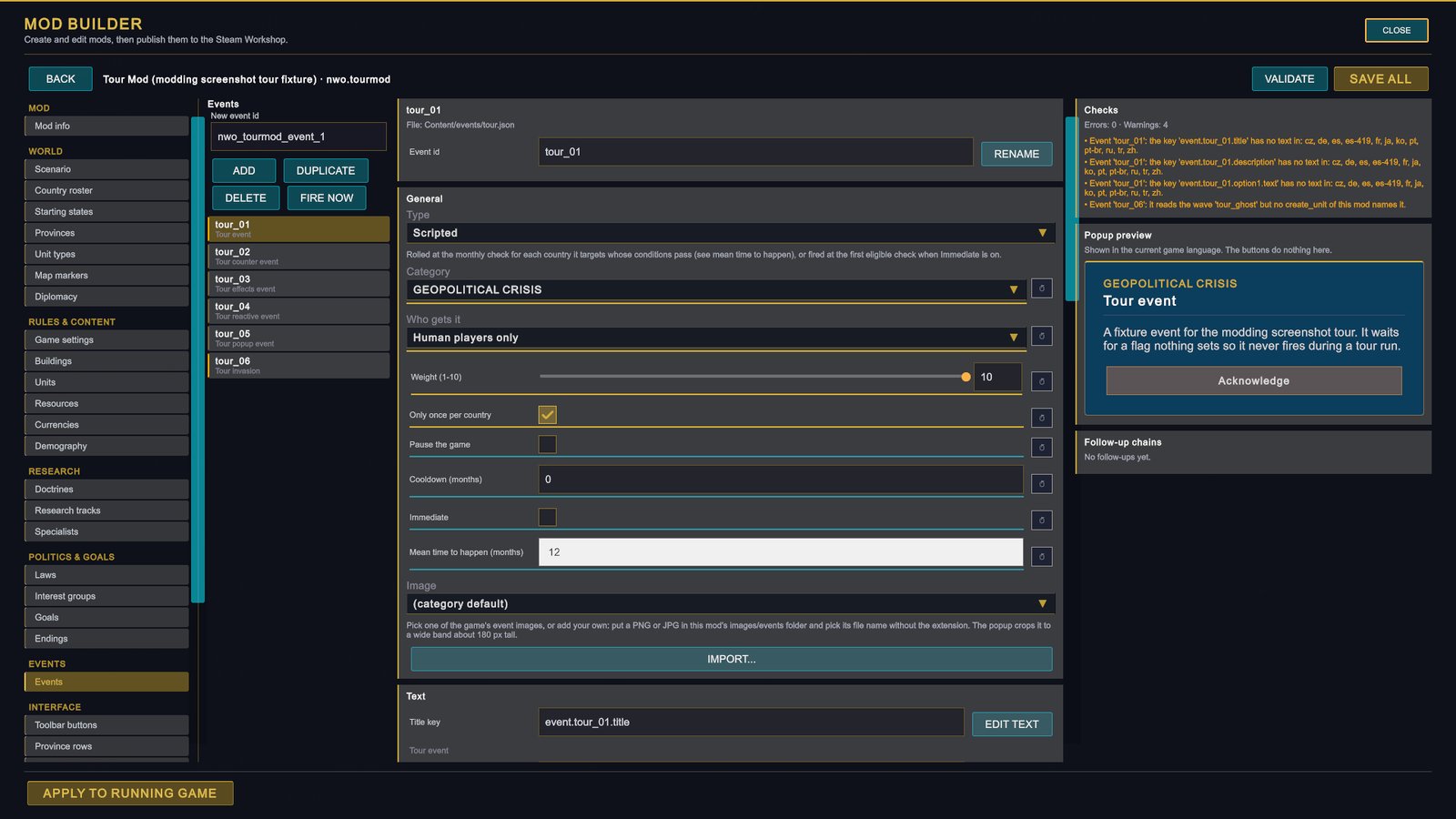
A staged shot with a test mod: the Events page as it looks when opened from the pause menu. FIRE NOW is under the new-event field, and APPLY TO RUNNING GAME is at the bottom left. -
Go back to the game. Click CLOSE, then resume. The popup opens once time is running.
FIRE NOW ignores the event’s conditions, its chance and fire_once, so you can fire the same event again to try the other option. Select atlas_02 and fire it to see the second popup without waiting a month.
Ask the game why
The developer console (the backquote key, by default) can explain an event that does not show up. Type event why atlas_01 and it tests each condition for your country and prints pass or FAIL. event pending lists the events waiting for your answer and the follow-ups on their way, with the days left. These two commands only read the game, so they work in the released game. The console’s event fire command changes the game and is refused there; use FIRE NOW instead. More on the console.
If something goes wrong
| What you see | Likely cause |
|---|---|
| The mod is not in the MOD LOADOUT list. | The folder is not inside one of the mods folders, or mod.json is not valid JSON or has no id. |
| The panel says “1 mod(s) failed to load. The game continues normally.” and the row has a LOAD ERROR badge. | A mistake in the event file. Click DETAILS to read what went wrong. A misspelt type, category, target, condition or effect skips the whole event. |
| June passes and no popup appears. | The mod is not enabled (its row should show [1]), an earlier event is still waiting for your answer, or you are spectating: a player event needs a country that a human controls. event why atlas_01 tests the conditions for you. |
| The first popup came, the second did not. | You chose Leave it to the scientists, or the month has not passed yet. event pending shows a queued follow-up and the days left. |
Three small changes to try
The game merges mod events into its event table once per world, so it does not read an event file again when you edit it by hand. After each change, save the file and load it one of two ways. In a running game: pause menu, Mod Builder, EDIT, then APPLY TO RUNNING GAME, which reloads the mod’s events and text into the game you are playing. Or restart the game and start a new one.
1. Make it happen sooner
Change the date in the condition of atlas_01:
{ "type": "date_after", "value": "2026-02" }In a new game the popup comes at the monthly check in February 2026. In a game where atlas_01 has already fired it stays quiet, because of fire_once.
2. Give the expedition a price
Add a third effect to the first option of atlas_01. Mind the comma after the line before it:
"effects": [
  { "type": "set_flag", "flag_name": "atlantis_investigated" },
  { "type": "fire_event", "chain_event": "atlas_02", "delay_months": 1 },
  { "type": "add_treasury", "value": -250000000 }
]
add_treasury adds an amount of money to the treasury of the country that chose the option, and a negative amount takes it away. Fire the event, choose Send an expedition and watch the treasury in the top bar. For a very small economy the game caps the amount: one event cannot move more than 5% of the country’s GDP.
3. Add a language
Copy en.csv to de.csv in the same folder and translate the text after the first comma on each line. Leave the keys as they are. Apply the change, switch the game to German under SETTINGS › LANGUAGE, and fire the event again.
The Mod Builder helps with this at scale: its VALIDATE button lists every key that has text in some languages and not in others, and its Translations page edits the text one language at a time and adds a new key to all 13 files at once.
Next
- The Mod Builder: the same work through forms, with checks, a popup preview and publishing.
- Old World Order: events and localization: how a large mod organises its events and their text.
- Folder layout and manifest: every folder a mod can have and every field of
mod.json. - What mods can change: the map of everything else a mod can do, with the list of reference pages.