This page takes you from the main menu to the first day of a new game. It explains every button on the way, what the difficulty labels mean, and which settings to choose when you have never played a game like this. The walkthrough on the following pages plays Australia, so that is the country picked here.
The main menu
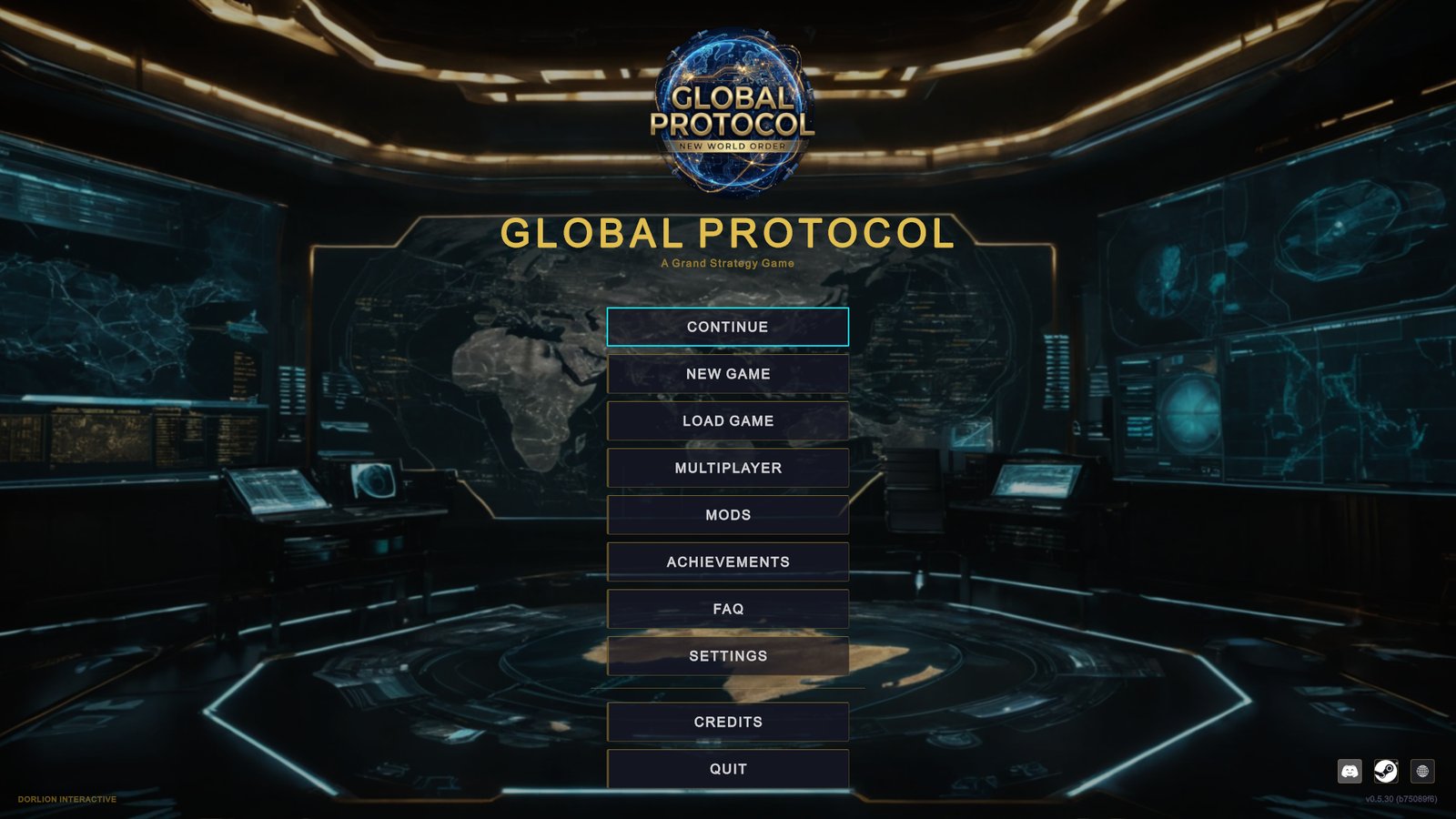
The buttons, from top to bottom:
| Button | What it does |
|---|---|
| CONTINUE | Loads your most recent single-player save. It is greyed out until you have one. Hover it to see which country and date that save holds. |
| NEW GAME | Opens the country select screen described below. |
| LOAD GAME | Lists your saved games so you can pick one. |
| MULTIPLAYER | Opens the multiplayer lobby, where you host a game or join someone else’s over Steam. See Multiplayer. |
| MODS | A mod is a change to the game made by players. This button lists the mods you have installed and lets you switch them on or off. The Steam Workshop browser and the Mod Builder open from here. See Mods and scenarios. |
| ACHIEVEMENTS | A gallery of every achievement and how many you have unlocked. |
| FAQ | The game’s own questions and answers, grouped by topic. The same panel opens from the pause menu during a game. |
| SETTINGS | Six tabs: GRAPHICS, AUDIO, GAMEPLAY, PRIVACY, LANGUAGE and CONTROLS. See Settings worth changing. |
| CREDITS | Who made the game. |
| QUIT | Asks you to confirm, then closes the game. |
In the bottom right corner are three small round buttons (Discord, the Steam page, the website) and the version number of your game.
You can ignore everything except NEW GAME for the moment.
Start a new game
-
Click NEW GAME. A screen titled SELECT YOUR COUNTRY opens. The left half is a list of every playable country. The right half says Click a country to begin.
-
Find Australia. Click the box that says Search countries… and type
Aus. The list shrinks as you type. The search matches a country’s name or its three-letter code. -
Click the Australia row. The right half fills in with the country card: flag, name, a difficulty label and seven lines of figures. The map behind the screen moves to Australia and shows through for a moment.
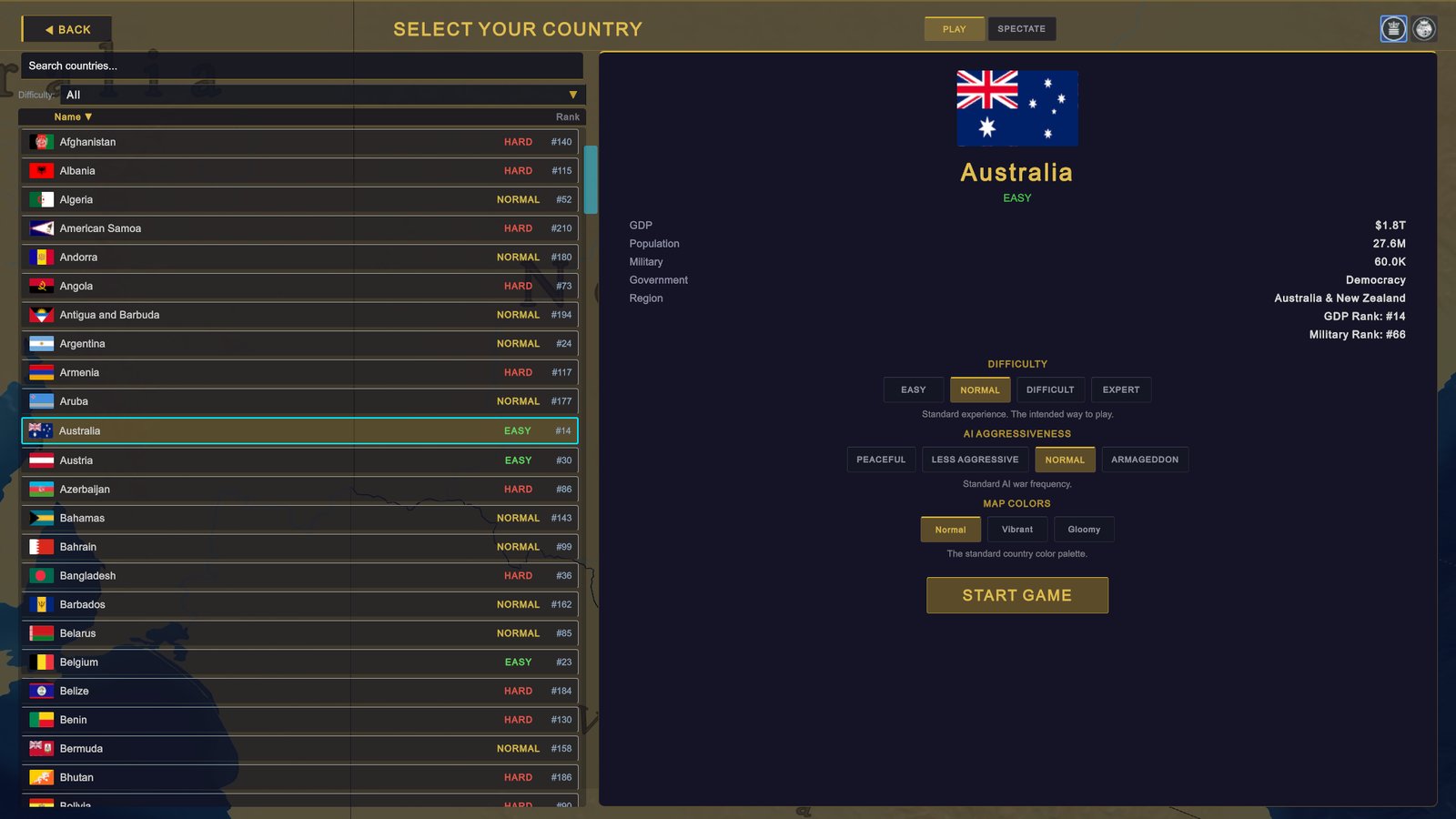
Country select in list view, with Australia selected. -
Set the two game settings. They appear under the figures once a country is selected. For a first game choose EASY under DIFFICULTY and LESS AGGRESSIVE under AI AGGRESSIVENESS. The reasons are under “The two game settings” below.
-
Click START GAME. The button sits at the bottom of the card.
The country select screen in detail
The list
Each row shows a flag, the country’s name, a coloured difficulty label and a rank number. The rank is the country’s place by GDP, the yearly value of everything a country produces: #1 is the largest economy.
- Click Name or Rank above the list to sort by that column.
- Use the Difficulty: box above the list to show only one group: All, Easy, Normal or Difficult.
The map
Two small icon buttons in the top right corner switch between LIST VIEW and MAP VIEW (hover them to see the names). In map view the list disappears and you pick straight from the world map.
- Hover a country and a small box shows its flag, name, difficulty label, Population, GDP, Treasury, Military and a rank line.
- Click the country to select it. The card stays pinned on the right.
- You can move and zoom the map as in the game itself.
- A country that a mod has taken out of play shows Not playable in this scenario.
What the country card tells you
| Line | Meaning |
|---|---|
| GDP | The size of the economy. Your tax income grows with it. |
| Population | How many people live there. |
| Military | The number of active military personnel. |
| Government | The form of government, for example a democracy. |
| Region | The part of the world the country is in. |
| GDP Rank | Its place among all countries by GDP. |
| Military Rank | Its place by military personnel. |
Hover any line for a short explanation.
The difficulty label
Every country carries the game’s own rating of how hard it is to play, from 1 (the most forgiving start) to 5. The screen does not print the number. It shows one of three groups:
| Rating | Label in the list | Label on the card and in the filter |
|---|---|---|
| 1 or 2 | EASY (green) | EASY / Easy |
| 3 | NORMAL (yellow) | NORMAL / Normal |
| 4 or 5 | HARD (red) | DIFFICULT / Difficult |
The rating describes the country’s starting situation. It is separate from the DIFFICULTY setting further down the card, which changes the rules for you whichever country you take.
Good first picks
All four are countries the game itself rates in the forgiving half. What follows is how each one starts in the game.
| Country | Rating | Why it works for a first game | What to watch |
|---|---|---|---|
| Australia | 2 (EASY) | No land borders: an attacker has to come by sea. The highest stability of the four at 85% (stability is how calm and orderly a country is). Allied with the United States and New Zealand, which are asked to join its defence if it is attacked. Inflation near 3% and debt at 50% of GDP. | A small army. That is fine while you are learning the economy. |
| United States | 1 (EASY) | The largest economy in the game, nuclear weapons, a NATO member with allies across two oceans. Two land neighbours. Mistakes cost little. | Debt starts above 100% of GDP, so an Excessive Debt warning greets you on day one. Several strong countries start hostile to you. |
| Germany | 2 (EASY) | The largest economy in Europe and a member of both the EU and NATO. Most of its neighbours are fellow EU members. | EU members follow the EU’s common trade rules: you cannot sign a trade agreement of your own, and a sanction (a ban on trade with a country) that you impose alone is a statement with no effect on trade. Trade measures are decided together on the Institutions page. See Common commercial policy. |
| Turkey | 3 (NORMAL) | A large army and a NATO member. A good second game, or a first one if you want problems to solve. | Inflation, how fast prices rise in a year, starts near 35% against a target of 4 to 6%. Corruption is high, stability is 55%, and several neighbours start cold or hostile. |
Not sure? Take Australia. The rest of this section uses it, so your screen will match the pictures.
The two game settings
Both settings sit on the country card, under the figures. In map view each is a drop-down box in place of a row of buttons.
DIFFICULTY
This setting changes four things, and all four apply to you, the player. It does not make AI countries, the ones the computer runs, richer or stronger.
| Level | AI countries’ appetite for war against you | Your economic growth | Your research | Your war exhaustion |
|---|---|---|---|---|
| EASY | Half of normal | About a quarter faster | 30% faster | Builds 30% slower |
| NORMAL | Normal | Normal | Normal | Normal |
| DIFFICULT | A quarter above normal | About 13% slower | 20% slower | Builds 25% faster |
| EXPERT | Half again above normal | About 23% slower | 30% slower | Builds 50% faster |
The growth change applies only while your economy is growing. War exhaustion is the strain a war puts on your country: it builds while you fight and pulls your stability down.
AI AGGRESSIVENESS
This setting decides how readily AI countries start wars, against you and against each other.
| Level | What it does |
|---|---|
| PEACEFUL | AI countries do not start wars of their own. They still join a war to defend an ally, and a coalition, a group of countries acting together, can still go to war against a country that has conquered too much. |
| LESS AGGRESSIVE | AI countries are well under half as willing to start a war as on NORMAL. |
| NORMAL | The standard amount of war. |
| ARMAGEDDON | AI countries are two and a half times as willing to start a war. |
For a war aimed at you, the two settings multiply. On EASY with LESS AGGRESSIVE, an AI country is about a fifth as willing to attack you as on NORMAL with NORMAL.
A combination for your first game
Choose EASY and LESS AGGRESSIVE.
- EASY gives you room for mistakes: your economy and research move faster, and a war wears you down more slowly.
- LESS AGGRESSIVE keeps the world alive. Wars still happen and you still learn to read the warning signs, but far fewer of them land on you.
- PEACEFUL is the choice if you want no AI country to start a war at all while you learn the screens. The world is quieter than the game intends.
The game describes NORMAL difficulty as “the intended way to play”. Move to NORMAL and NORMAL for your second game.
MAP COLORS
Three choices for how country colours are drawn on the map: Normal, Vibrant (brighter) and Gloomy (darker). This changes looks only. Your choice is remembered for later games, and you can change it during a game in SETTINGS › GRAPHICS, where the same setting is called Country Colors.
Play or spectate
At the top of the screen are two buttons, PLAY and SPECTATE. PLAY is selected every time the screen opens.
SPECTATE starts a game in which the AI runs every country and you only watch. The start button changes to OBSERVE WORLD. Picking a country then only sets where the camera starts, and the card says so: Starting view: Australia. The settings stay on screen, and AI AGGRESSIVENESS still decides how much war there is to watch. Spectating is for single player only. See Spectator mode.
What happens when you press START GAME
- The country select screen closes and the map centres on your country.
- The game starts paused. Nothing moves until you unpause, so there is no hurry.
- A guided tour of the interface opens with a box titled Welcome to Global Protocol. Click NEXT ▶ to step through it, or SKIP TUTORIAL to close it. You can bring it back from the pause menu with RESTART TUTORIAL.
- When the tour ends, the goal at the top of the outliner, the list panel on the right side of the screen, tells you what to do first.
If your screen looks different
- The settings are drop-down boxes, and there is no list. You are in map view. Click the list icon in the top right corner to go back.
- Countries are missing, or there are ones you do not recognise. A mod that brings its own scenario, a different starting world, is switched on. Open MODS on the main menu to check.
- The button says SELECT COUNTRY, and DIFFICULTY and AI AGGRESSIVENESS are missing. You are in a multiplayer lobby, where the host sets both. A row marked Taken by belongs to another player. In the demo, a country you cannot start shows Available in the full game under the start button.
Next
Your first ten minutes: the first day as Australia, step by step.