Your first month set five things in motion. This page covers the rest of the year: what to check each month, what to add when you feel ready, and how to read the summary the game shows you on the first 1 January. You do not need a war, a spy or a missile in this year. The aim is a country that is a little richer and calmer than it started, and a player who knows where the buttons are.
The numbers come from the same played game as Australia. Yours will differ.
A plan for the year
| When | What to do | What is happening by itself |
|---|---|---|
| February and March | Answer what is waiting for you. Fill the second research slot. Check the Overview on the 1st of each month. | The Technology Park is being built. The diplomat is at work. |
| April to June | Offer a first trade agreement. Queue a few more buildings. | The Patrol Boat is finished four months after the order. |
| July to September | Choose your next goal when Economic Foundation is complete. Choose your next research when the first is done. | The Technology Park is finished about seven months after you queued it. A first doctrine takes eight months at the earliest. |
| October to December | Change one law if you want to try it. Save before the year ends. | The Year Review opens on 1 January. |
None of the dates is a deadline. If a quarter passes and you only did the monthly check, nothing is lost.
The monthly check
Buildings, research and the budget are worked out on the 1st of each month. So the habit is: click Skip to next month, and when the game pauses on the 1st, look at the Overview page before anything else.
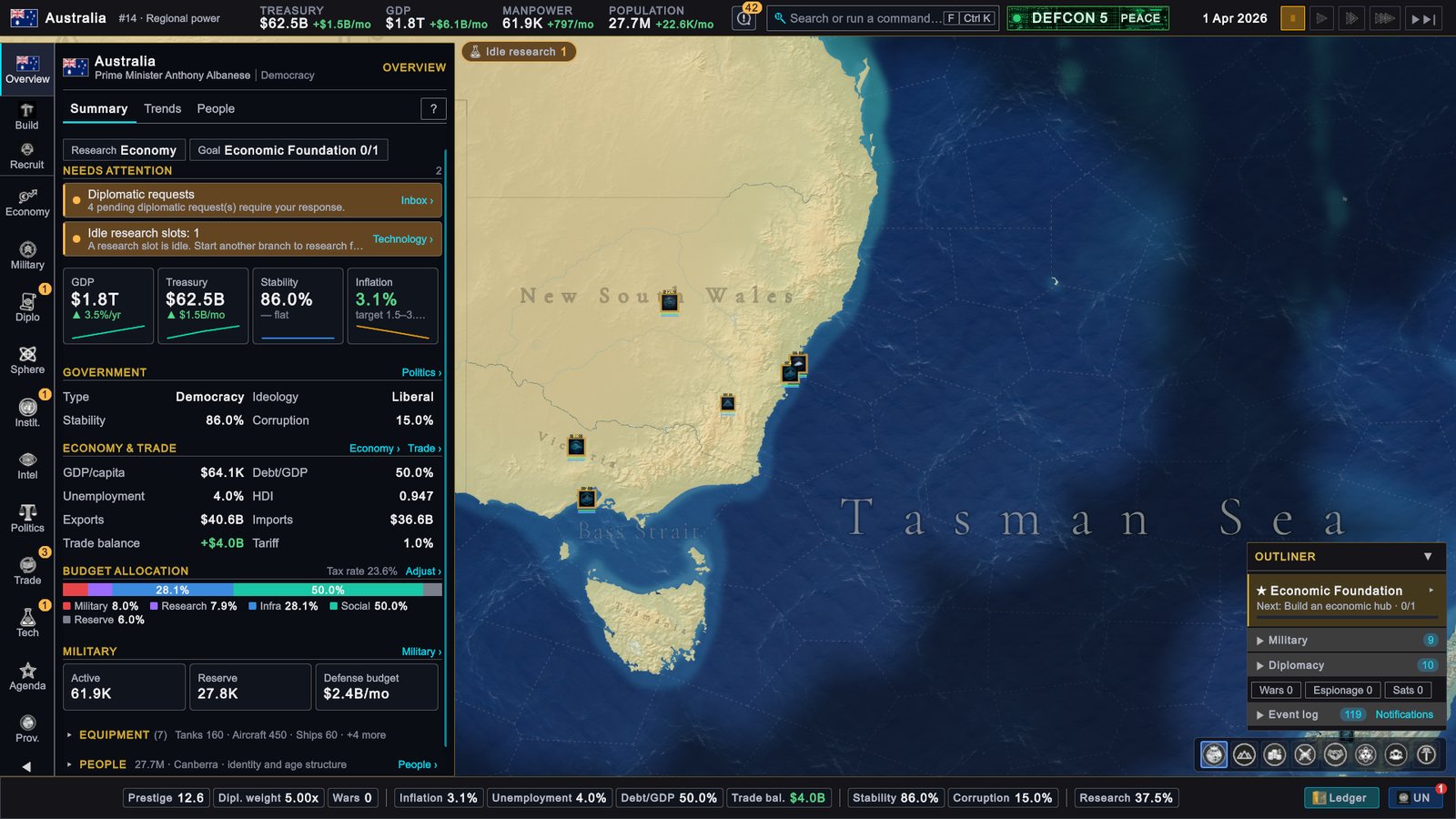
The GDP tile tells you whether the economy grows: a green arrow and a percentage per year. GDP is the yearly value of everything your country produces. The other three tiles are the ones that can go wrong, and each grows a Fix › link when it does.
| Tile | In this game on 1 April | Healthy | Look closer when |
|---|---|---|---|
| Treasury, the state’s money | $62.5B, ▲ $1.5B/mo | The monthly figure is green | It is red several months in a row |
| Stability, how calm the country is | 86.0%, flat | Level or rising | It falls month after month, or drops below 60% |
| Inflation, how fast prices rise | 3.1%, target 1.5–3.5% | Inside the target band | It is above the band |
Then read Needs attention above the tiles. On 1 April it listed two things: “Diplomatic requests” and “Idle research slots: 1”. Each entry has a link to the page that deals with it.
If a tile shows Fix ›, When something goes wrong has the steps for each case.
Finish Economic Foundation, then choose the next goal
Your tracked goal is complete when the Technology Park is finished. The game does not move on to another goal by itself. In this game the outliner, the list panel in the lower right corner, then read “No active goal · choose one”, and the Overview listed “No Active Goal” under Needs attention with a link, Agenda ›.
-
Open the Agenda. Click Agenda on the rail, the column of buttons on the far left (Q by default).
-
Look under Other goals. Five goals carry the Starter label. Click a row to unfold it and read its steps.
-
Click Set Active Goal on the one you want. It appears in the outliner with its next step.
| Starter goal | Its steps | Good as a next goal? |
|---|---|---|
| Provincial Development | Develop your provinces, 0/3: “Complete 3 new factories, trade ports, highways, power plants, mines or farms.” | Yes. It is more of what you did in the first month. |
| Technology Advancement | Open Research Panel, Queue Key Research, Maintain Tech Parity | Yes. Its steps are about research, which you have already begun. |
| Diplomatic Standing | Take a diplomatic action, Improve Priority Relations, Sign a Strategic Agreement | Yes. In this game it already stood at 2/3 on the first day. |
| Military Readiness | Open Military Panel, Prepare Forces, Execute War Objective | Later. |
| Intelligence Network | Open Intelligence Panel, Deploy Operatives, Counter Espionage | Later. |
Every goal makes progress whether you track it or not. Tracking only decides which one the outliner shows. So buildings you queue for one goal are not wasted on another. More in Agenda and national goals.
To queue more buildings, click Build on the rail as in the first month. A province runs up to three projects at once.
Keep research going
Research has two slots, and in the first month you filled one. Fill the other with a doctrine from a different branch: click Technology on the rail (the button reads Tech), then ↗ Open Knowledge Network, pick a card and click Begin Research as before. Once both slots are busy, that button reads Queue Research, and a queued pick starts by itself when a slot is free.
In this game the Overview read “Idle research slots: 1” on 1 April and “Idle research slots: 2” on 1 January 2027: by then nothing was being researched. An idle slot is lost time, because every tier has a minimum time that money cannot shorten. More in Knowledge Network.
Answer what is waiting for you
The card Waiting for your answer at the top right counts proposals from other countries that need a yes or no. On 1 February it showed 9.
- Click the card to review them. The same proposals are listed on Diplomacy › Inbox, and under Pending actions when you click the bell in the top bar.
- Read what each side gets. A trade offer says what you get and what the other country gets. It opens on Trade › Offers, where you can Accept, Counter or Reject.
- Saying no has a small price. Rejecting a proposal costs a few points of relations with the sender.
- Doing nothing is allowed. A proposal lapses at its deadline. In this game a toast later read “Trade Proposal Expired”.
- Be careful with two kinds. An alliance and a call to arms can pull you into a war. Read Your first war, and how to avoid one before you accept either.
More in Diplomatic actions and treaties.
A first trade agreement
A trade agreement is a lasting deal with one country. It lowers the tariff, the tax on imports, on goods traded between the two of you. It lifts both countries’ exports, adds a small growth bonus and raises relations a little every month.
-
Pick a friendly country. Open Diplomacy › Relations and choose one from the Friendly or Warm group. In this game India stood at +45 and Japan at +55 in that list. The list shows your view of them. To see their view of you, click Columns ▾ and switch on Theirs.
-
Open its card. Click its row. The card opens on the right.
-
Click the Relations tab, then OFFER TRADE AGREEMENT. The button is in the group PACTS & TREATIES.
-
Set the terms and send. A window asks for the tariff reduction, the export boost and up to eight priority resources. A country run by the computer answers at once.
A country run by the computer accepts when its view of you is 20 or more (50 if it treats you as a rival) and there is no sanction or trade war between you. An embassy, a permanent diplomatic mission, in that country counts in your favour. If it refuses, send a diplomat with IMPROVE RELATIONS and try again later. More in Trade.
A first law
Laws are the slowest lever you have. There are eight categories, such as Tax Regime and Conscription, and one option is in force in each. Changing one is optional in your first year. Do it once to learn the screen.
-
Open Politics › Laws (K opens Politics by default).
-
Open one category. Click the arrow at the end of its row. Each option is a card with its effects, its price and its support.
-
Read the support line. It shows the share of parliament in favour and the line it has to pass. Choose an option that is above the line.
-
Click Add to Package, then click Show builder and Submit Package.
What to expect:
- It costs money at once. Each change costs between $3 billion and $5 billion, paid when you submit. You get nothing back if the vote fails.
- It takes time. Parliament debates for three months per change, then votes. A package passes with more than 50%. The Legislation row of the outliner counts down to the vote.
- One change is enough. A package with several changes debates longer and keeps parliament busy longer afterwards.
- The category then rests. A category that changed cannot change again for 12 to 24 months.
More in Laws.
Saving, and when to speed up
Saving. The game saves by itself every 5 minutes of real time, into a single save called Autosave that is replaced each time. Before a decision you might regret, save under your own name: press Esc (by default), click SAVE GAME, type a name and click SAVE.
Speed. While you are learning, Skip to next month is enough: one click, one month, a pause. When a month has nothing for you, try Fast (a month in 30 seconds) or Very Fast (a month in 12 seconds). With the default settings the game still pauses by itself when a popup needs your answer. Press Space (by default) whenever you want to stop and read. More in Time, speed and saving.
The Year Review
On 1 January the game pauses and opens the review of the year that ended.
In this game it read:
| Line | Value | In plain words |
|---|---|---|
| GDP CHANGE | +$67.1B (+3.8%) | The economy is 3.8% larger than a year ago. |
| TREASURY CHANGE | +$14.2B (+23.5%) | The state holds $14.2B more than a year ago. |
| BUILDINGS CONSTRUCTED | 1 | One building was finished during the year. |
| TOP PROVINCE | New South Wales — $592.6B GDP | Your richest province. |
| DEFENSE SPENDING | -$29.4B | What the armed forces cost in the year. |
- The sentence at the bottom sums the year up. Here it said: “Solid progress. Keep the momentum.” The game calls a year solid when GDP grew by 1% or more, and outstanding from 5%.
- ANNUAL FISCAL LEDGER unfolds when you click it. It lists the year’s income and spending by kind.
- ANNUAL GDP DELTA LEDGER splits the year’s change in GDP by cause. Read it to see what helped and what held you back.
- CONTINUE closes the review.
If GDP and the treasury both grew, your first year went well.
The Ledger: how you compare
The Ledger is a table of all countries. Open it with Ledger at the right end of the status bar, the row of figures along the bottom, or press G (by default).
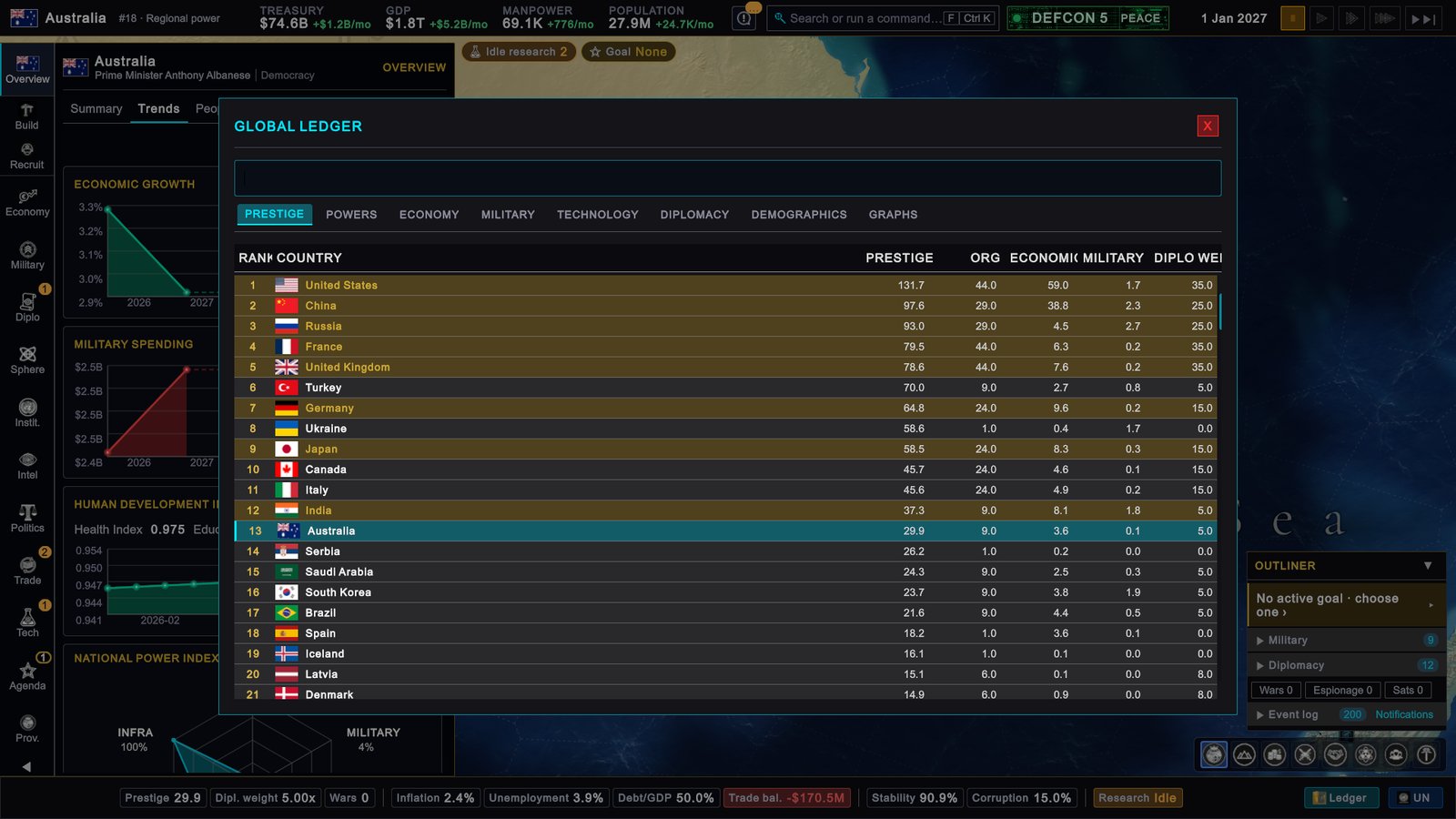
- The window is titled GLOBAL LEDGER and has eight tabs: PRESTIGE, POWERS, ECONOMY, MILITARY, TECHNOLOGY, DIPLOMACY, DEMOGRAPHICS and GRAPHS.
- In the picture it is on PRESTIGE. Prestige is your standing in the world. In this game Australia was 13th with 29.9 on 1 January 2027, up from 12.6 on the first day.
- Click ECONOMY to compare economies, and GRAPHS for lines over time.
- The number next to your name in the top bar is a different ranking, the Global Power Rank. It counts GDP, military personnel and completed research. In this game it read #14 on the first day and #18 a year later. Hover it to see what you need to climb one place.
You do not have to climb any table. The Ledger is there to show where you stand, and after ten years of game time the game starts to check whether a country has won. More in Victory, score and the Ledger.
If your screen looks different
- You play another country. Your goals, your laws and your friends are your own. A country without an elected parliament changes laws by decree: there is no vote, and the change takes effect when you submit it.
- OFFER TRADE AGREEMENT is greyed out. Hover it for the reason. Members of some unions, such as the EU in the game, negotiate trade together and cannot sign an agreement of their own.
- The Year Review opened while the clock kept running. Pause on Event Popup is switched off in SETTINGS › GAMEPLAY.
- Your tiles show other arrows. That is your game, not an error. Use the table under “The monthly check” to judge them.
Next
When something goes wrong: how the game warns you, and a fix for each early problem.