Goals give a campaign direction. Each goal is a named objective for your country, broken into steps the game checks for you, and some pay a reward when you finish them. Nothing forces you to follow them, but the tracked goal is the quickest answer to “what should I do next?”.
Where to find it
- Click Agenda on the rail (Q by default).
- Board view ↗ at the top of the Agenda page opens the Goal Board, a full-screen planner titled National Goal Planner.
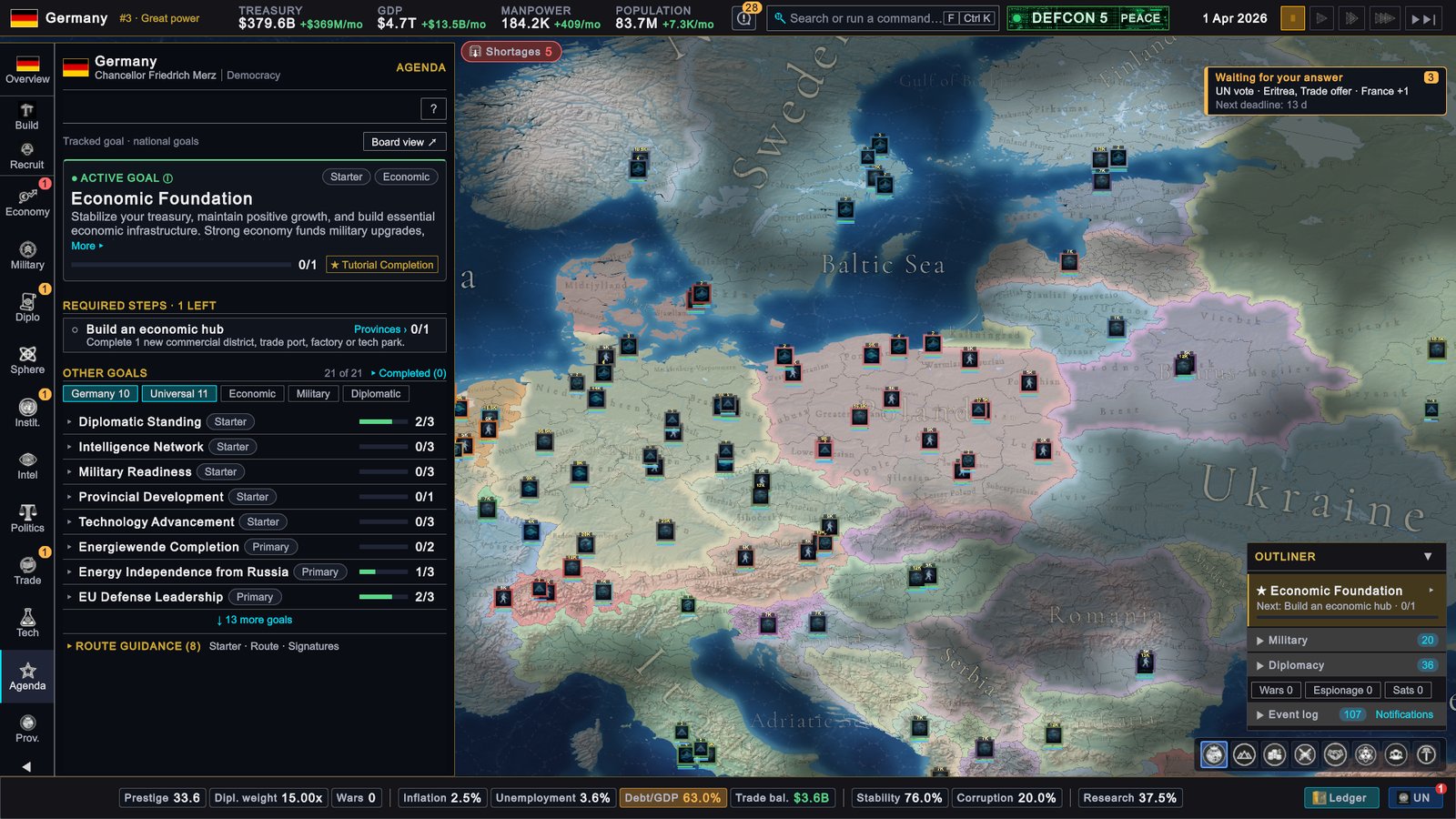
- The tracked goal sits at the top of the Outliner with its next step and a progress bar. Click it to open the Agenda.
How it works
Universal and national goals
Goals come from two lists:
- Universal goals are shared by every country. There are twelve, from Economic Foundation, Military Readiness and Diplomatic Standing to Welfare State and Constitutional Reform.
- National goals are written for one country: its ambitions, rivals and alliances. Some countries have their own set. A country without one has the universal goals only.
The Agenda’s filter chips show how many of each you have.
Types and priorities
Every goal has a type and a priority, shown as pills on its card.
- Type says what the goal is about: Expansion, Territorial, Economic, Unification, Defense, Prestige, Diplomatic, Ideological, Technology or Intelligence.
- Priority is Starter, Primary, Secondary or Aspirational. It sorts the goals on the Goal Board. It does not stop you from pursuing any of them.
Steps
A goal is complete when all its Required steps are done. A step is a condition the game checks against your country. Typical steps:
- build a number of buildings of some kind
- field enough units of one type
- complete a number of doctrine tiers
- sign an alliance, a defensive pact or a trade agreement with named countries
- open an embassy, keep relations above a level or guarantee a country’s independence
- reach a GDP or treasury figure
- run espionage missions against a number of targets
- bring a country into your sphere, control a number of provinces or declare a war
Each step shows its progress as a count, for example 0/1, and a link to the page where you act on it, such as Provinces ›. Hover the title for the full description. Several Starter goals use first-time steps instead, such as opening a page or recruiting a first unit.
Tracking
In the game’s own words: every goal progresses on its own; the active goal is the one whose steps are tracked on the Agenda and in the Outliner. You have one active goal at a time. A new game starts with Economic Foundation active.
To track another goal, expand it under Other goals and press Set Active Goal, or use the Goal Board. When the active goal completes, nothing is tracked until you choose again; the Agenda shows No goal tracked and a Recommended goal to pick up.
Completion and rewards
The game checks all your goals once a month, tracked or not. It also checks them whenever the Agenda page refreshes, so opening the Agenda can complete a goal whose steps are already done and pay its reward on the spot, without waiting for the monthly check. While the page is open, a toast reports each step and each goal it sees finish.
A completed goal stays completed, and its reward is paid once.
Rewards come in two kinds:
- Prestige, as a bonus that fades over about three years.
- Stability, added at once.
Only some goals carry a reward. The Goal Board shows them as chips such as +20 Prestige and +5 Stability under Completion Rewards; a goal with no reward reads No special rewards. Only rewards shown with a number are paid.
The Agenda page
- Active goal. Its priority and type, description (More ▸ unfolds it), a progress bar, the reward and the flags of its target countries.
- Required steps. The open steps, with the number left in the heading. Finished steps fold under Completed steps.
- Other goals. One row per goal with its progress. Chips filter the list: your country’s own goals, Universal, Economic, Military and Diplomatic. A row opens to show the reward, the first steps and Set Active Goal. Completed shows the goals you have finished.
- Route guidance. See below.
The Goal Board
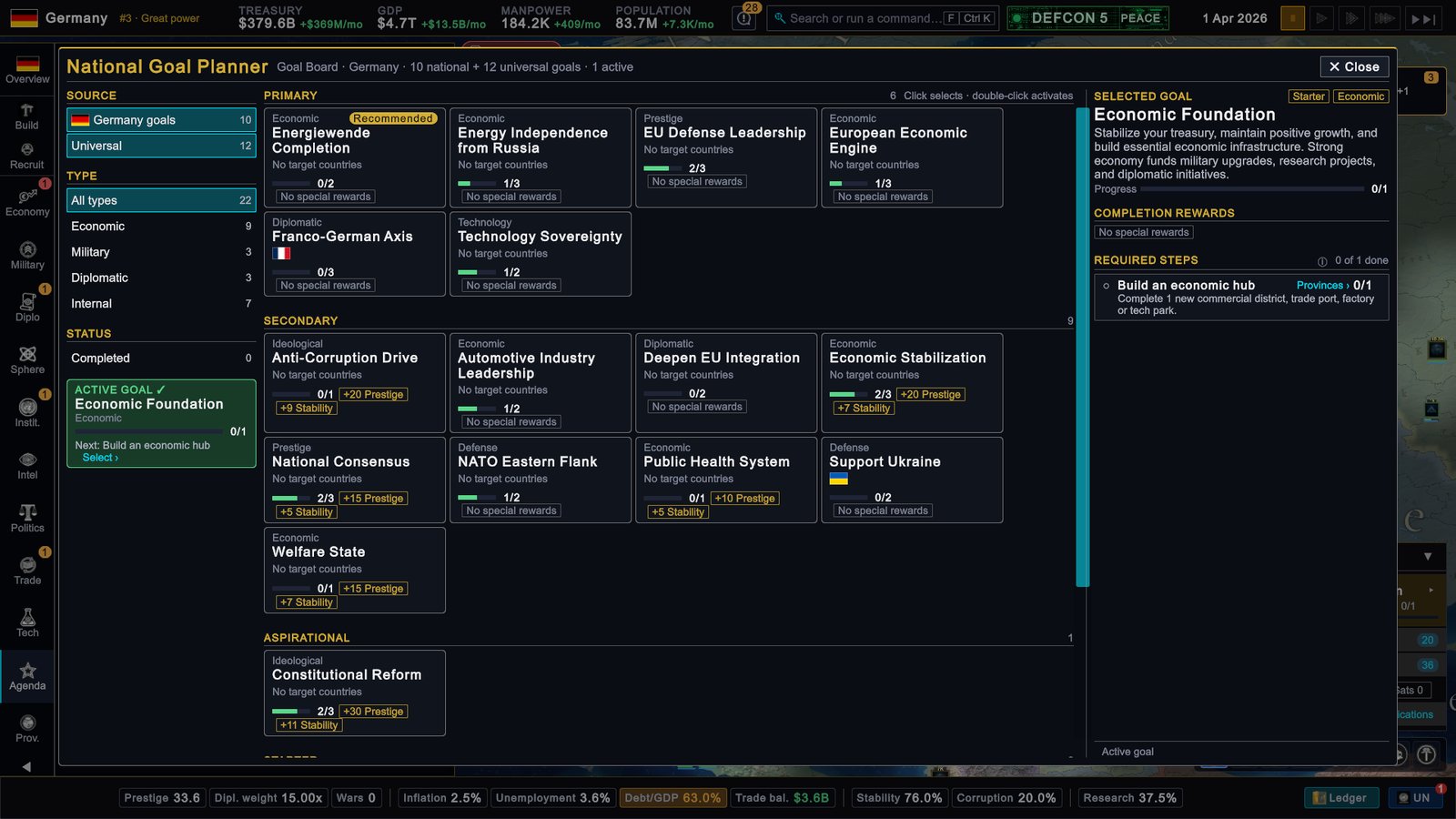
- Left. Filters by Source (your country’s goals or Universal), Type (Economic, Military, Diplomatic, Internal) and Status (Completed). The active goal is pinned underneath with its next step.
- Centre. Goal cards in lanes: Primary, Secondary, Aspirational, Starter. A card shows the type, title, target flags, progress and reward chips. Click selects a goal; double-click makes it the active goal.
- Right. The selected goal: description, progress, Completion Rewards, Targets and Required Steps with their page links. Set Active Goal at the bottom says which goal it replaces.
Goal targets on the map
A goal aimed at particular countries shows their flags: three, then a +n counter with the full list on hover. On the Agenda page, hovering a flag tints that country on the map. On the Goal Board, Show targets on map closes the board, tints every target country, dims the rest and moves the camera to frame them. The map legend reads Goal targets.
Route guidance
Some countries have a focus route: a suggested line of play with short advice cards. On the Agenda page they sit folded under Route guidance, in three groups: Starter, Route and Signatures. A card names a move and what to aim for; its hover adds which goal the move advances and why. On the Goal Board, Best supported by names the route card that helps the selected goal.
Route cards are advice. They have no progress count and pay no reward. A country without a focus route shows no Route guidance line.
What to do
- Use the tracked goal as a to-do list in the first year. The Starter goals walk you through the economy, construction, research and diplomacy.
- Browse the Goal Board for rewards. Sort out which goals pay Prestige and Stability and which of their steps you would take anyway.
- Track the goal you are working on. Tracking changes nothing about progress, but it keeps the next step in the Outliner and one click from the right page.
- Open the Agenda after a big move. If a treaty or a finished building completed a goal, the reward arrives when the page opens.
- Read target lists as a plan, not an order. A goal that names a neighbour for war is one way to play that country. Skipping a goal costs nothing.