Sooner or later a number turns red. This page first shows the four places where the game tells you something needs attention, then goes through the problems a new player meets first. Each one has the warning you see, the reason in plain words, and what to click.
Nothing here is urgent to the minute. Press Space (by default) to pause, read, then act.
How the game tells you
The priority strip
The priority strip is the row of pills, small rounded labels, at the top of the map. It shows the three things that need you most, and a + pill with a number when there are more.
- Red is bad. Amber needs a decision. A gold ring is an opportunity, not a problem.
- Hover a pill to open a card: what is wrong, the current value, and a button named after the page that fixes it, for example Monetary ›.
- Click a pill to jump straight to that page. For most pills a short help box opens beside it.
- Right-click a pill (or click Snooze or mute… on the card) for three choices: Mute this alert, Snooze for 30 days, and Why am I seeing this?, which gives the reason and a line that begins “Clears when”.
- To bring hidden alerts back, use Show hidden alerts under Needs attention on Overview › Summary.
The pills a new player sees most:
| Pill | It appears when | It opens |
|---|---|---|
| Treasury | Your treasury is below zero | Economy › Budget |
| Inflation | Inflation is above 5%, or well above your own target | Economy › Monetary |
| Shortages | A shortage of a strategic resource, one the game treats as vital, is costing you | Economy › Resources |
| Stability | Stability is below 40% (unless that is close to normal for your country), or is on course to fall well below today’s value | The page for whatever drags it most |
| Debt/GDP | Debt is above 100% of GDP, the yearly value of everything your country produces | Economy › Budget |
| Unemployment | Unemployment is above 7% | Economy › Budget |
| Corruption | Corruption is high or rising | Politics › Decisions, or Politics › Laws |
| Events | An event is waiting for your choice | The event’s own window |
| Requests | Another country is waiting for your answer | Diplomacy › Inbox |
| Idle research | A research slot is empty | Technology |
| Goal | You have no active goal | Agenda |
| War exhaustion | War exhaustion, the strain of a long war, is above 50% | Military › Wars |
| DEFCON | Your nuclear alert level is at 3 or lower (5 is peace) | Military › Strategic |
Others exist for a blockaded coast, for low import cover and for spheres of influence. They work the same way.
The same alerts also appear as a small number on the rail, the column of page buttons on the far left, and as a list under Needs attention on Overview › Summary. On that page the Treasury, Stability and Inflation tiles grow a Fix › link when they are off track. It opens the same page as the pill.
The status bar
The status bar runs along the bottom of the screen. Each chip is one figure, and its colour is a quick health check.
| Chip | Amber | Red |
|---|---|---|
| Inflation | Above 5% | Above 10% |
| Unemployment | Above 7% | Above 12% |
| Debt/GDP | Above 60% | Above 100% |
| Stability | Below 60% | Below 40% |
| Corruption | Above 40% | Above 55% |
| Trade bal. | Below zero (green above zero) |
Hover a chip for a breakdown of what is moving the number. Click it to open the page that controls it.
Toasts
Toasts are the small messages that slide in on the right. At most three show at once. When more are waiting, a line reads more in Notifications. There are three kinds:
- Waiting for your answer. This card stays at the top of the column. It collects every request from another country that needs a yes or no, with the nearest deadline. A request you ignore lapses at its deadline. Click the card to review them.
- Warnings. Shortages, threats and orders that failed.
- World news. What other countries did, rolled up into one toast.
Results of your own orders show here too, ahead of everything else.
The notification centre
Click the bell in the top bar, or press N (by default). The panel is titled Notifications and keeps every toast of the session, including the ones you missed.
- The buttons at the top filter the list: All, Results, Action, Warning, World, Mine and Events.
- Pending actions lists the requests still waiting, each with a Review button.
- Mark all read clears the number on the bell.
- Mute on a row stops that kind of message from popping up. It is still recorded here.
Spending more than you earn
What you see. In the top bar, the change next to TREASURY is red and negative. On Overview › Summary the Treasury tile shows Fix ›. If the money runs out, a red Treasury pill appears: “Treasury below zero” and “Reduce spending or increase revenue.”
Why. Your treasury is the money the state holds. Every month it receives taxes and pays for the budget, the upkeep of your armed forces, interest on debt and anything you bought. If it ends a month below zero, the state borrows the difference: the treasury goes back to zero and your debt grows. So the red pill may vanish by itself, but the debt it left behind does not.
-
Open the budget. Click Economy on the rail, then the Budget tab (E opens Economy by default).
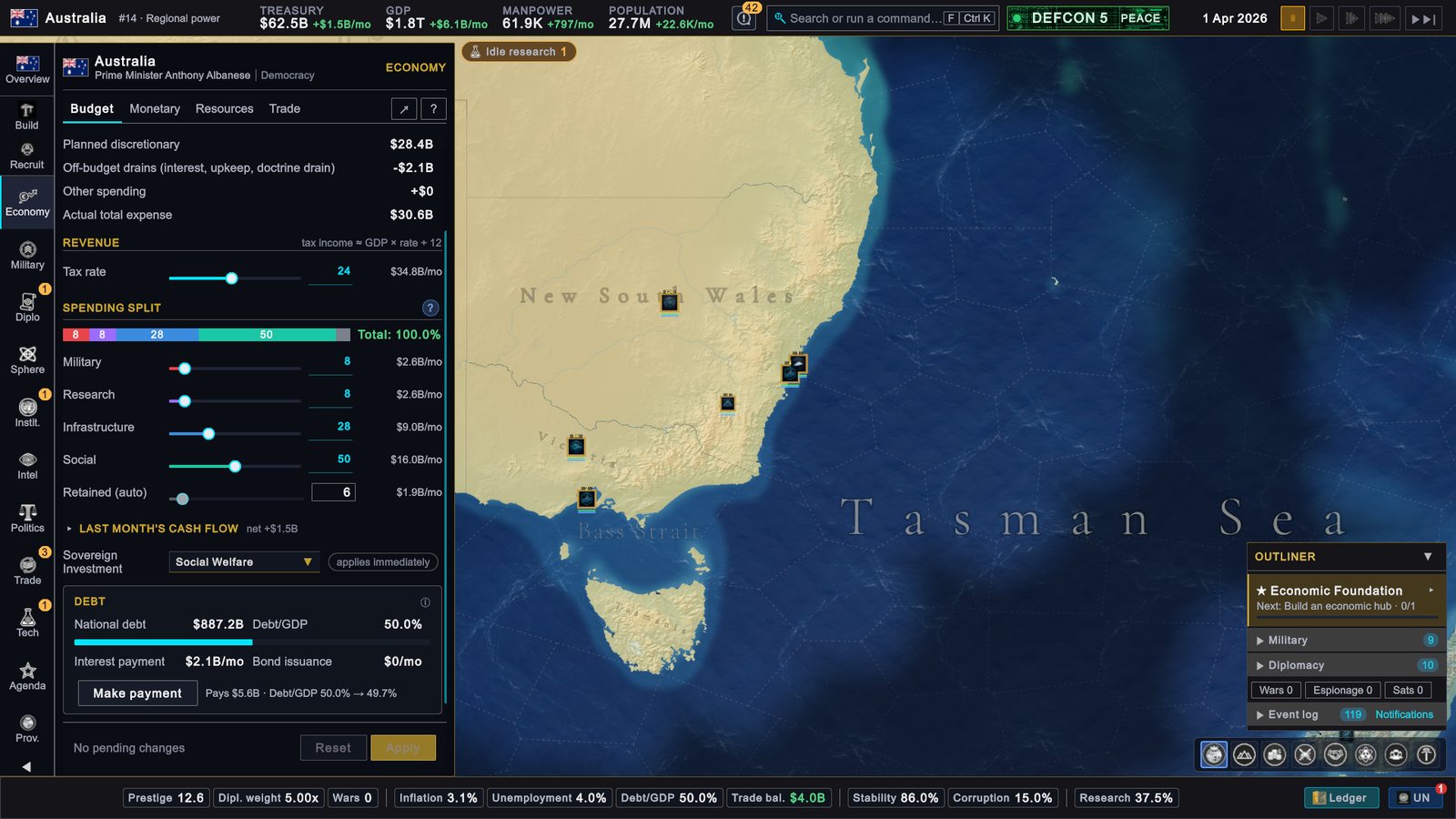
Australia, 1 April 2026: the Budget tab, with the tax rate, the spending split and the debt card. -
Read the four tiles at the top. Revenue/mo is what came in last month, Expenses/mo what went out, Net/mo the difference. They stay empty until the first month has closed.
-
Find the cause. Click Last month’s cash flow to see each kind of income and spending.
-
Cut spending. Under Spending split, drag one of the four sliders (Military, Research, Infrastructure, Social) to the left. Whatever the four leave unspent shows as Retained (auto) and stays in the treasury.
-
Or raise income. Drag Tax rate to the right. More tax comes in.
-
Click Apply. Nothing changes until you do.
Each cut has a price. A lower Social share lowers stability over time. A lower Military share slows the refill of manpower, the pool of people you can recruit. If it no longer covers the upkeep of your forces, part of the gap is still taken from the treasury and your units fight worse. More in Budget, taxes and debt.
Inflation too high
What you see. The Inflation chip on the status bar turns amber or red. An Inflation pill appears with the title “High Inflation” and your rate next to your target.
Why. Inflation is how fast prices rise in a year. In the game it is pushed up by a budget deficit, by dearer imports and by an economy running hot. It is pulled down by a policy rate, the central bank’s interest rate, that sits above the neutral rate. The slider marks the neutral rate with a gold tick. High inflation slows growth and lowers stability.
-
Open Economy › Monetary. The top line shows INFLATION, your rate and your Target band.
-
Read the text under Policy rate. If it starts “Your central bank sets the rate”, the bank is steering the rate for you. This is the default. Inflation is worked out once a month, so judge the result over a few months.
-
To push harder, raise the rate yourself. Drag Policy rate to the right and click Apply. The line under the slider tells you how much inflation falls each month and what it costs in growth. A higher rate also makes your debt dearer. Let the central bank decide hands the rate back.
-
In an emergency, click DEPLOY RESERVE SHIELD. It moves money from the treasury into a stabilization reserve that spends itself to pull inflation down. The cost is shown next to the button. It is only available while inflation is above the top of your target band.
-
Close any budget deficit. See the previous problem.
Policy stance does not move inflation. Switching between Ease, Neutral and Tighten nudges growth a little. The control that brings inflation down is the rate, set against the neutral rate.
More in Inflation and monetary policy.
A shortage of a good
What you see. A Shortages pill and a “Resource Shortage” toast. The text lists the damage (construction speed, recruitment cost, unrest) and says “Secure imports or domestic production to restore output.”
Why. Your country uses more of a resource than it produces and imports, and the stockpile has run down. For a strategic resource, one the game treats as vital, this slows all construction, makes recruiting dearer and adds unrest, which is disorder in your provinces, the small areas your country is divided into.
-
Open Trade › Overview (X opens Trade by default). It lists every resource and how long your stock lasts.
-
Click Find Supply on the row of the resource you are short of. The Buy/Sell tab opens with that resource chosen.
-
Pick a seller. The list compares the world market with every country that can spare the resource, by the full cost delivered to you. Click a row.
-
Set the amount and click Place order. The goods are paid for from your treasury.
-
Make it automatic. On the Auto Trade tab, click the resource, switch on Buy automatically when short and click Apply. The state then keeps a reserve by itself.
A purchase builds a buffer. The penalty lifts once your stock covers about three months of the shortfall. The lasting fix is to produce more: click Build on the rail to open Recommendations, a view of Provinces › Construction that suggests what to build and where. More in Resources and goods and Trade.
Stability falling
What you see. The Stability chip turns amber below 60% and red below 40%. A Stability pill appears, titled “Low Stability” or “Stability falling”, with a line such as “Biggest drag:” and a name.
Why. Stability measures how calm and orderly your country is, from 0 to 100%. It follows a target: every month it drifts a little toward it. The target starts from your country’s own baseline, rises with social spending and some laws, and falls with inflation, unemployment, unrest, war exhaustion, heavy debt and corruption. To raise stability for good, you raise the target.
-
Hover the Stability chip. Find the list headed Target (Equilibrium). The largest negative line is your problem.
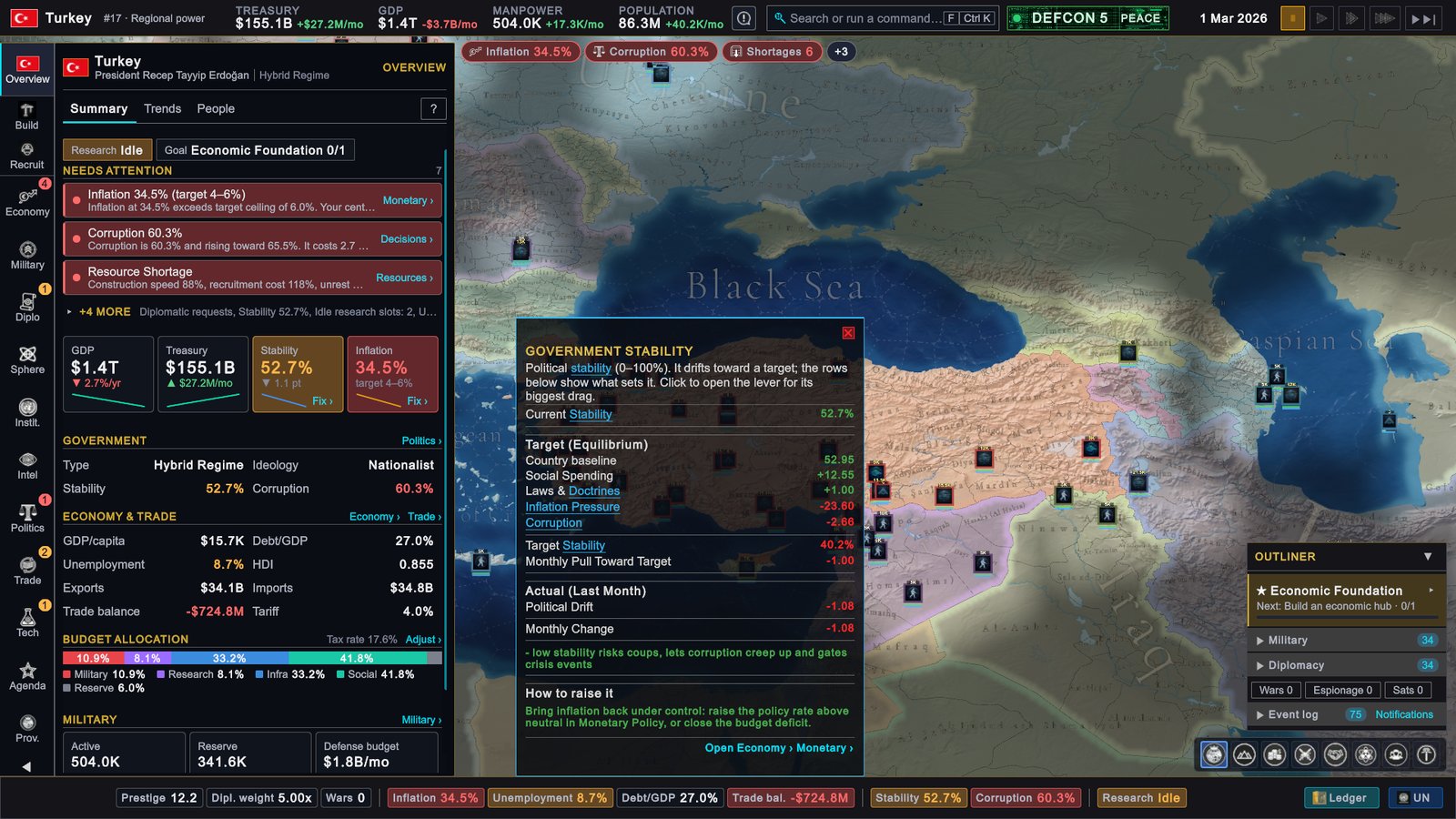
Turkey, 1 March 2026: the Stability chip's tooltip, with the target and what sets it. -
Click the chip. It opens the page that deals with the biggest drag.
-
Act on that drag.
| The drag | What to do |
|---|---|
| Inflation Pressure | Bring inflation down in Economy › Monetary. |
| Average Unrest | Raise the Social share, build schools, hospitals and libraries, end shortages. |
| War Exhaustion | Make peace. War exhaustion, the strain of a long war, fades once the fighting stops. |
| Excess Debt | Run a surplus or pay debt down. See “Debt growing” below. |
| Corruption | Corruption leaks tax income and lowers the target. Start an Anti-corruption campaign in Politics › Decisions. |
| Excess Unemployment | It falls when the economy grows faster than usual. |
If nothing drags, you can still lift the target: raise the Social share in Economy › Budget, or pass a law marked “Stability target” in Politics › Laws. Rewards from events and goals raise stability at once, but it then drifts back toward the target month by month. More in Stability, corruption and coups.
Unrest and coup risk
What you see. Unrest is disorder inside one province. Open Provinces › Overview: the Unrest column shows each province (click the heading to sort by it), and the Unrest >25 filter shows only the troubled ones. Coup risk, the monthly chance that the military seizes power, is on Politics › Decisions.
Why. Unrest rises with poverty and shortages. It cuts what the province produces and drags the country’s stability down. Coup risk opens up once stability is below 30% and grows the further it falls, and corruption makes it likelier. Resentment against decrees and bans adds to the risk at any level of stability.
What to do.
- For unrest: raise the Social share of the budget, build schools, hospitals and libraries in the worst provinces, and end resource shortages.
- For coup risk: get stability back above 30% using the section above. If the risk is already high, Purge Generals on Politics › Decisions lowers it. It costs money and a temporary drop in stability.
Debt growing
What you see. The Debt/GDP chip shows your debt as a share of GDP, the yearly value of everything your country produces. It turns amber above 60% and red above 100%. Above 100% a red Debt/GDP pill appears, titled “Excessive Debt”.
Why. National debt grows whenever the treasury ends a month below zero. You pay interest on it every month, and the interest rate climbs once debt passes 100% of GDP. Debt well above your country’s usual level also lowers stability.
-
Open Economy › Budget and scroll to the Debt card.
-
Look at Bond issuance. If it is not zero, you borrowed last month. Fix the deficit first, as described above.
-
Run a surplus. When more comes in than goes out, part of it pays debt back every month. This works down to the level of debt your country started the game with, and stops there.
-
Click Make payment. It pays a slice of the debt straight from the treasury. The line next to the button shows the amount and what Debt/GDP becomes. You can do this once a month.
More in Budget, taxes and debt.
Not enough manpower
What you see. On Military › Recruit a unit you want shows Insufficient manpower. The MANPOWER figure in the top bar is low.
Why. Manpower is the pool of people you can recruit. Every unit takes some out. The pool refills each month, faster with a larger population, a well-funded military and a stricter conscription law.
What to do, from the gentlest option to the most costly:
- Wait. The top bar shows the monthly change next to MANPOWER.
- Raise the Military share in Economy › Budget. It speeds the refill.
- Disband a unit you do not need. Half of its manpower is returned.
- Hire contract soldiers. On Military › Overview, the Contract soldiers card buys manpower with treasury money. Drag the slider and click Set Target.
- Change the Conscription law, the law on military service, in Politics › Laws. Selective Service and Mandatory Service refill the pool faster, at a cost in growth and unrest.
More in Land forces and Laws.
An event popup you do not understand
What you see. A window with a category at the top, such as ECONOMIC SHOCK or INTERNAL POLITICS, a title, a short story and one or more choices. By default the game pauses itself while the window is open.
How to read it.
- Hover each option. A box headed Expected impact: lists what that choice does.
- A greyed option cannot be chosen. Hover it for the reason, for example “Requires being at peace.”
- There is no rush. While the game is paused the event waits for as long as you like. If you have switched the pause off, a line reads “Auto-selecting default in” and a number of days, and after 30 days of game time the game picks the first available option for you.
- Your choice takes effect at once and can lead to further events.
To read an event again later, open Notifications and click Events. The pause comes from Pause on Event Popup in SETTINGS › GAMEPLAY, which is on by default. More in Events and crises.
Another country threatening you
What you see. World news toasts name you: “Public Denouncement”, “UN Condemnation”, “Trade War Escalated”. On Diplomacy › Relations the country sits in the Cold or Hostile group. The last step is a window titled Ultimatum with a demand, a deadline and two buttons, Yield and Refuse.
Why. An AI country that wants a war usually climbs a ladder first: it denounces you, puts pressure on your trade, builds up its forces, and sends an ultimatum before it declares war. The climb takes months, so you have time. If its relations with you recover to +25 or better on the way, it drops the plan, and a “Tensions Eased” toast tells you so.
-
Open the country’s card. Click the country on the map. Its card opens on the right.
-
Click the Relations tab, then IMPROVE RELATIONS. A diplomat starts raising relations in both directions.
-
Check who stands with you. On Diplomacy › Relations, click Allies. A country with strong allies is a much less tempting target.
-
If an ultimatum arrives, read both buttons. Yield signs a truce between the two of you, a period in which neither side may declare war, and the other country drops its war plan. Refuse may lead to war, and gives the other side a justification that makes the war cheaper for them.
-
Prepare in case it comes. Raise the Military share of the budget and recruit.
The next page covers the war itself. More on the ladder in Sanctions, economic warfare and ultimatums.
If your screen looks different
- You do not see a pill for your problem. The strip shows three. Hover the + pill for the rest, or check whether you muted or snoozed it: Show hidden alerts on Overview › Summary brings it back.
- The rail shows shorter names. The buttons on the rail read Diplo, Instit., Intel, Tech and Prov. for Diplomacy, Institutions, Intelligence, Technology and Provinces. Hover a button for its full name.
- A button is greyed out. Hover it. A disabled button says why.
Next
Your first war, and how to avoid one: staying out of wars, and what to do in one.